
Before You Begin
- You must be logged into the Facilipay Business Dashboard with permission to create customer profiles.
- Have the customer's details ready — name, email, and any relevant card or band information.
Step-by-Step: Create a New Customer Profile
-
Log In to the Business Dashboard
Sign in to the Facilipay Business Dashboard. -
Open the Create Menu
Click the Create button in the top-right corner of the dashboard. -
Select Customer
From the options displayed, select Customer.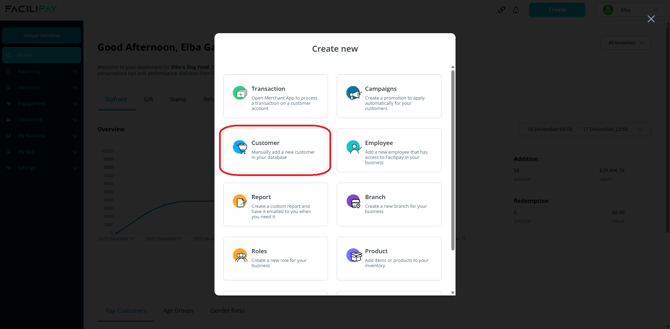
-
Enter Customer Details
Fill in the customer's information on the customer details screen. Note that it is important to input accurate details for any potential future campaigns you may want to run. -
Link a Card or Band (Optional)
If the customer has a card or band, open the Card/Band section, enter the band details, and click Link. -
Save the Profile
Click Save to create the new customer profile in your dashboard.
Tips & Best Practices
-
Capture full details: The campaigns tool works much more effectively when additional customer information (such as email or demographics) is included in the profile.
-
Verify before saving: Double-check the email address and contact details — these will be used for campaign targeting and notifications.
-
Where possible, let customers enter their own details: This improves accuracy and supports customer consent.