
Before You Begin
- You must be logged into the Facilipay Business Dashboard with admin access.
- Have the destination URLs ready for any links you want to add.
Step-by-Step: Add a New Link
-
Log In to the Business Dashboard
Sign in to your Facilipay Business Dashboard. -
Go to My Business → Design
From the main navigation, click My Business, then select Design. -
Locate the More Menu Section
Scroll down through the App Design page until you reach the More Menu section.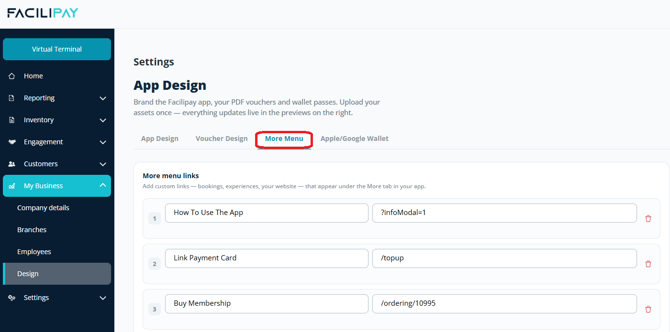
-
Add a New Link
Click the + button to create a new link entry.
-
Enter the Link Details
Add the name you want customers to see and the URL they should be directed to when tapped.
-
Save Your Changes
Click Save to apply the new link. -
Verify in the App
Open the Facilipay app or your custom-branded app and tap More to confirm the new link appears correctly.
What Happens After You Save
-
Customers will see the new link in the More section of your app profile.
-
Tapping the link will direct them straight to the URL you entered.
-
You can return to App Design at any time to add, edit, or remove links.
Tips & Best Practices
-
Use clear, descriptive names: Customers should know what to expect before tapping — for example, "Book a Table" rather than "Bookings".
-
Test every link: Open the app after saving to confirm each link opens the correct destination.
-
Keep it focused: Add only the links your customers genuinely need — too many can overwhelm the More section.