
Before You Begin
- You must be logged into the Facilipay Dashboard with admin access.
- Have a list of allergens for each product ready before you start.
Step-by-Step: Add Allergens to a Product
-
Open Products
Log in to the Facilipay Dashboard, click Inventory, then select Products.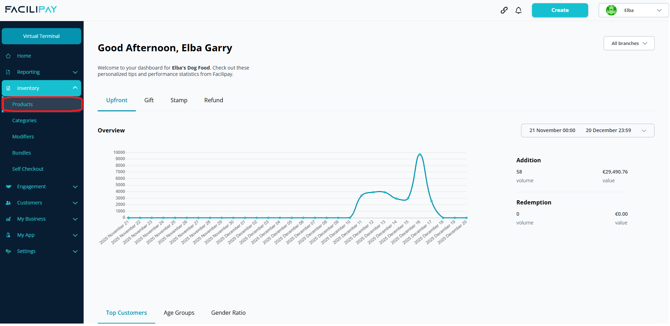
-
Find the Product
Search for the product using the search bar, or scroll through the product list. Click on the product to open its details. -
Select Allergens
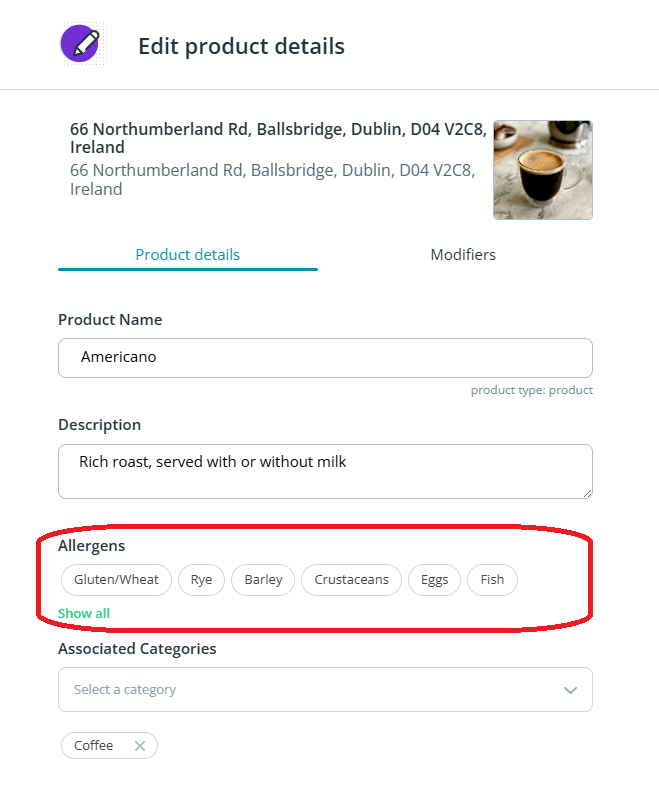
Click the applicable allergens from the list. Ensure selected allergens are highlighted.Note: The allergen list is predefined and cannot be edited.
-
Save Your Changes
Click Save to apply.
What Customers Will See
The selected allergens are displayed to customers when viewing and ordering the product, helping them make informed choices.
Tips & Best Practices
-
Audit regularly: Review allergens whenever recipes or suppliers change.
-
Be thorough: Tag every relevant allergen — under-reporting can have serious consequences.
-
Train staff: Make sure team members understand which products contain which allergens for in-person queries.