
Before You Begin
- You must be logged into the Facilipay Dashboard with admin access.
- Have the credentials provided by Authipay ready: Store ID, Shared Secret, Fiserv API Key, and Fiserv API Secret.
Step-by-Step: Connect Authipay
-
Open Online Payments Settings
From the Facilipay Dashboard, select Settings, then click Online Payments.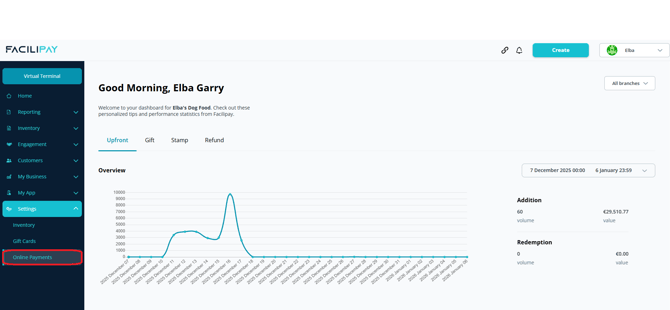
-
Edit Authipay Settings
Locate Authipay in the list of available gateways and click Edit beside it.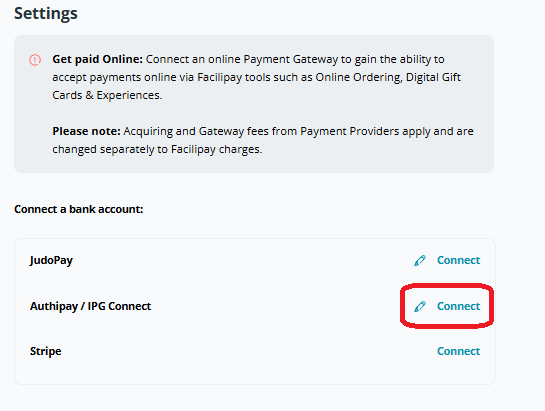
-
Enter Gateway Credentials
Enter the following details provided by Authipay:- Store ID
- Shared Secret
- Fiserv API Key
- Fiserv API Secret
Click Save when complete.
-
Verify Online Payments
Once saved, online payments are automatically enabled. You can complete a test transaction by purchasing a Digital Gift Card from your business to confirm the integration is working correctly.
What Happens After Connection
-
Online payments are processed through Authipay and settle into your business bank account.
-
Customers can purchase digital gift cards, top up balances, and pay for online orders.
-
You can return to Settings → Online Payments at any time to update your credentials.
Tips & Best Practices
-
Run a test transaction: Always validate the integration with a small test purchase after connecting.
-
Keep credentials secure: Treat Authipay credentials like any other sensitive payment information — do not share them outside trusted personnel.
-
Need help? If a test transaction fails, contact support@facilipay.io.