
Before You Begin
- Have the Merchant App installed on your smartphone or tablet.
- Use the same login credentials you use for facilipay.io.
Step-by-Step: Apply Loyalty Credit
-
Log In to the Facilipay Merchant app
Open the app on your smartphone or tablet. Use the same login credentials you use for facilipay.io. -
Locate the Customer Account
Enter the customer's name or account number to find their account. Use the toggle switch in the app to switch between searching by name or account number.
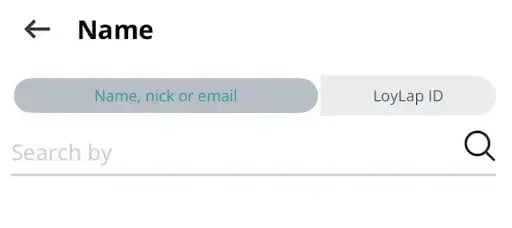
-
Apply Loyalty Credit
- Open the customer account and tap Loyalty Credit
- Enter the total transaction amount
- The system automatically calculates and applies the bonus based on your configured loyalty settings
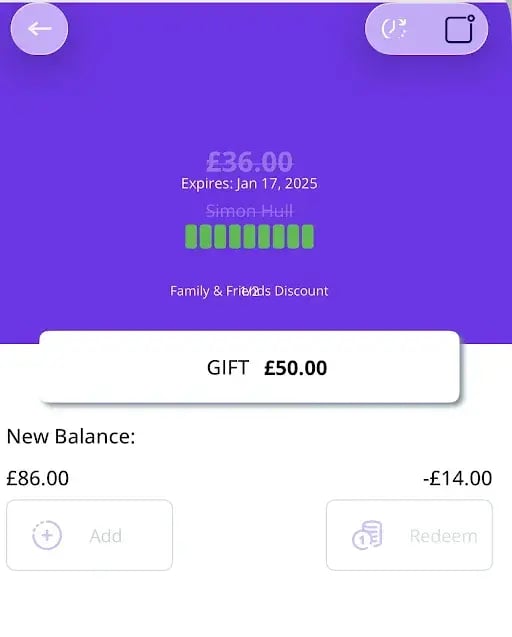
What Happens After You Apply
The customer's account now reflects the bonus earned for their purchase.
Tips & Best Practices
-
Configure loyalty first: Make sure your loyalty settings are configured correctly so bonuses calculate as expected.
-
Verify the customer: Confirm you've selected the right customer before applying.
-
Need help? For more details on configuring loyalty settings, refer to the Facilipay Loyalty Setup Guide. For other issues, contact support@facilipay.io.