
Before You Begin
- You must be logged into the Facilipay Dashboard with admin permissions.
- Identify the customer account that needs overdraft access enabled.
Step-by-Step: Enable Overdraft
-
Open the Customers Section
From the Facilipay Dashboard, select Customers from the left-hand navigation menu, then click on Customers from the sub-menu.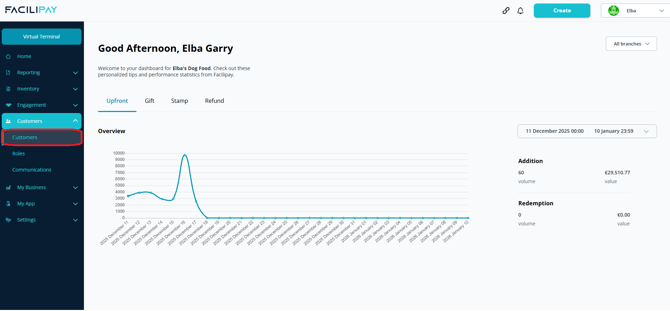
-
Locate the Customer
Search for or scroll to find the relevant customer. Click the three dots beside their name and select Edit Modifiers.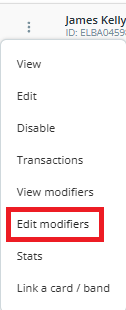
-
Enable Credit Allowance
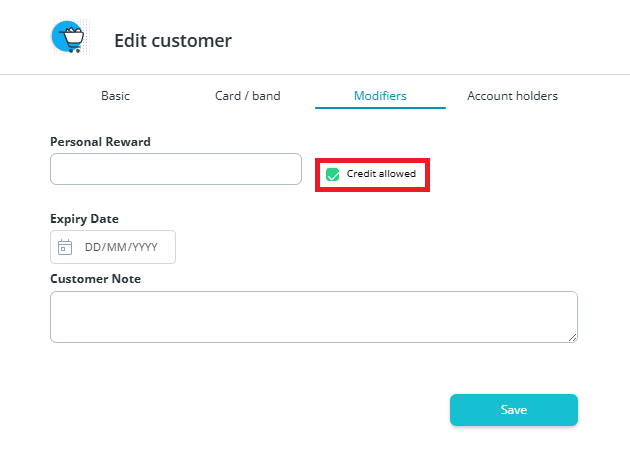
In the Edit Modifiers window:- Tick the Credit Allowed option
- Click Save
What Happens After You Save
The selected customer account can now go into a negative balance, allowing overdraft (credit) on transactions. The customer will continue to be able to make purchases even when their balance reaches zero.
Tips & Best Practices
-
Use sparingly: Reserve overdraft for trusted customers or known internal accounts — not as a default setting.
-
Set internal limits: Decide your internal credit limit before enabling overdraft and monitor balances regularly.
-
Disable when no longer needed: Return to Edit Modifiers to remove credit allowance once it's no longer required.