
Before You Begin
- You must be logged into the Facilipay Business Portal with reporting access.
- Decide on the date range and branch (if applicable) you want to analyse before running the report.
Step-by-Step: Run an Item Sales Report
-
Log In to the Business Portal
Sign in to the Facilipay Business Portal with your business credentials. -
Navigate to Reporting → Item Sales
From the main menu, click Reporting, then select Item Sales.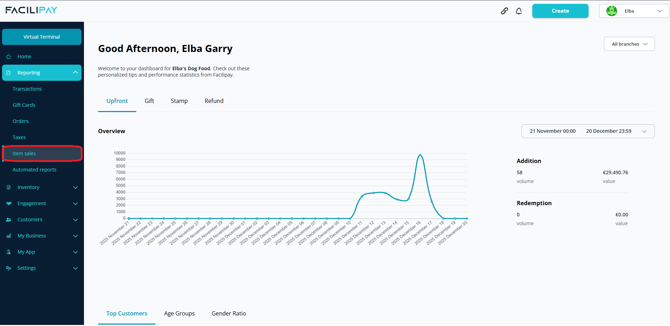
-
Review the Default View
The report displays product sales for the current month by default, sorted by the most popular items.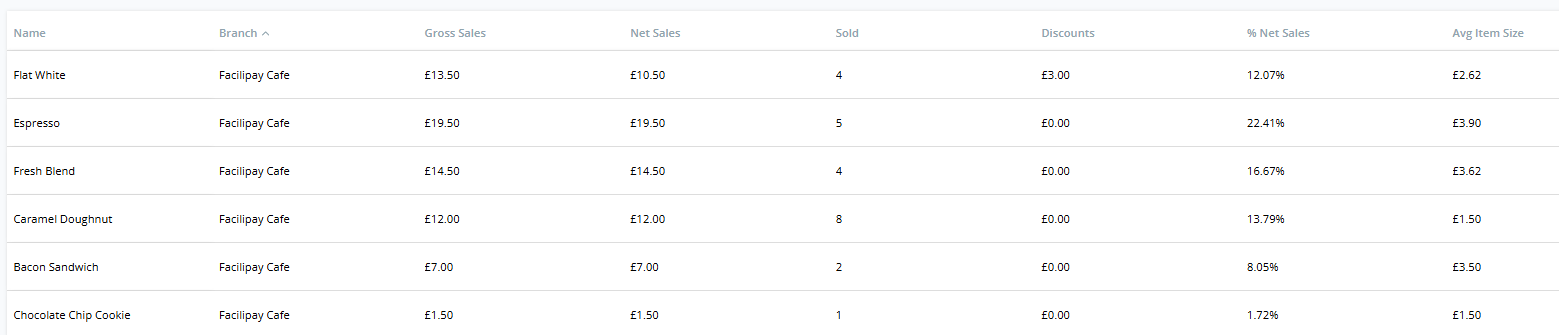
-
Apply Date Filters
Use the date picker to select a custom date range and refine the report to your chosen reporting period. -
Filter by Branch (Optional)
If your business has multiple locations, use the branch filter to analyse sales for a specific location. -
Export the Report
To download the results, click Export in the top-right corner. The report can be exported as a CSV or Excel file.
What You Can Do With This Report
-
Identify top-selling products and underperformers
-
Compare product performance across different periods or branches
-
Inform menu, inventory, and pricing decisions
-
Share insights with your team or accountant
Tips & Best Practices
-
Compare like-for-like periods: Use month-on-month or year-on-year comparisons to spot meaningful trends.
-
Combine filters: Use date and branch filters together for precise insight into a specific period and location.
-
Export regularly: Schedule a routine export to track your top sellers over time.