
Before You Begin
- You must have access to your Clover POS device with the Order Ahead app installed.
- Decide whether you want all orders auto-accepted before enabling.
Step-by-Step: Enable Auto-Accept
-
Open the Order Ahead App
From your Clover POS device, open the Order Ahead app. -
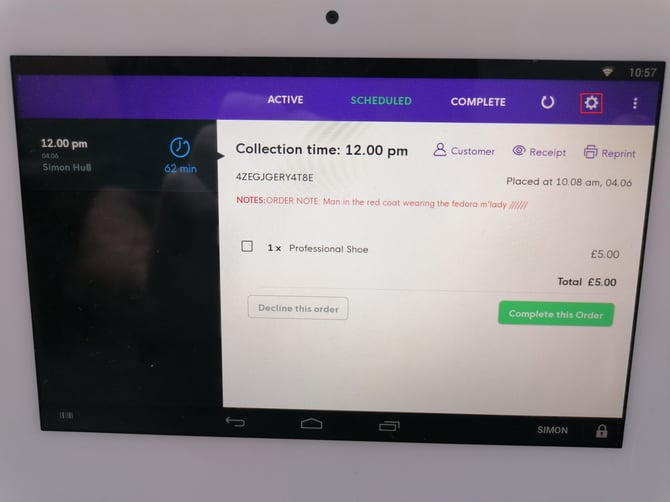
Open Settings
Tap the Settings icon in the top-right corner of the screen. This opens the Preferences menu.
-
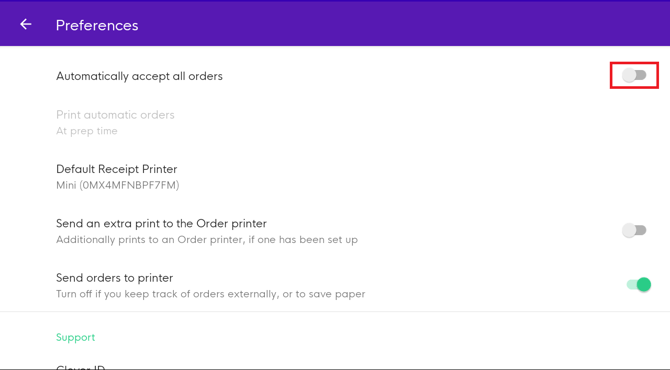
Toggle Auto-Accept
Scroll down to the Accept Orders Automatically option:- Toggle ON to automatically accept all incoming orders.
- Toggle OFF to manually review and accept each order.
What Happens After You Enable
Your order acceptance settings are updated. New orders are accepted automatically without staff intervention.
Tips & Best Practices
-
Use during peak times: Auto-accept reduces delays during busy periods.
-
Train staff to monitor: Even with auto-accept on, staff should monitor the queue closely.
-
Disable if capacity is constrained: Switch off auto-accept if your kitchen needs to triage orders manually.