
Before You Begin
- You must be logged into the Facilipay Dashboard with admin access.
- Have your customer data ready in spreadsheet form before downloading the template.
Step-by-Step: Upload New Customers
-
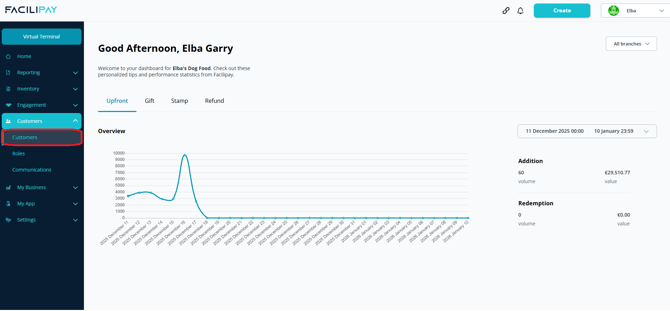
Open Customer Upload
- Log in to the Facilipay Dashboard
- Click Customers
- Select Customers
- Click Bulk Upload (next to the search bar)
- Choose New Customers

-
Download the Template
Click How to Use, then download the provided CSV template.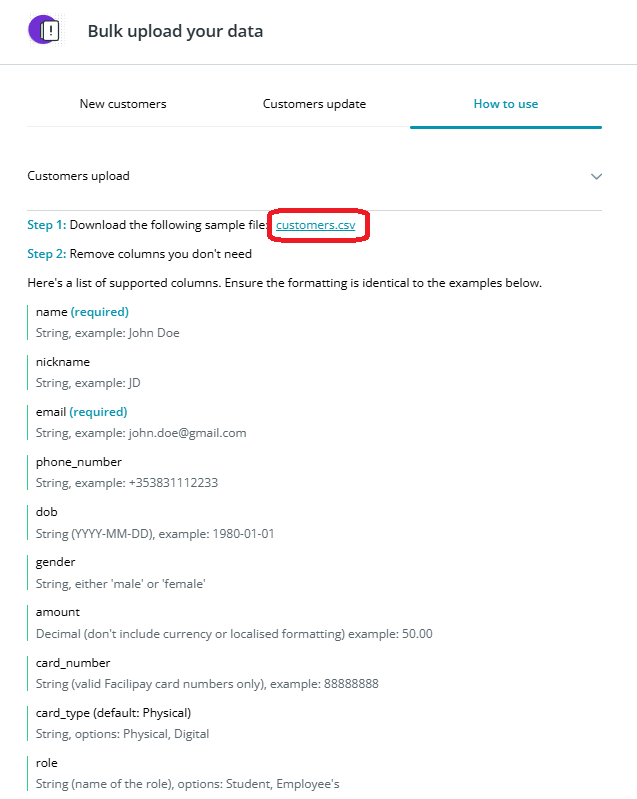
Tip: Review the instructions before completing the file to ensure correct formatting.
-
Prepare Your File
Complete the CSV with the following fields:- Name (required): Customer name
- Nickname (optional): Alternative identifier
- Email (required): Valid email (e.g. name@example.com)
- Phone_number (optional): Enter without spaces
- Date of birth (optional): Format
YYYY-MM-DD(e.g. 1992-03-24) - Gender (optional)
- Amount (optional):
- Decimal format only (e.g. 50.00)
- Do not include currency symbols
- Card_number (optional): Enter only Facilipay card numbers
- Card_type (optional): Specify physical or digital — used for reporting and tracking
- Role (optional): Assign a predefined role to the account
-
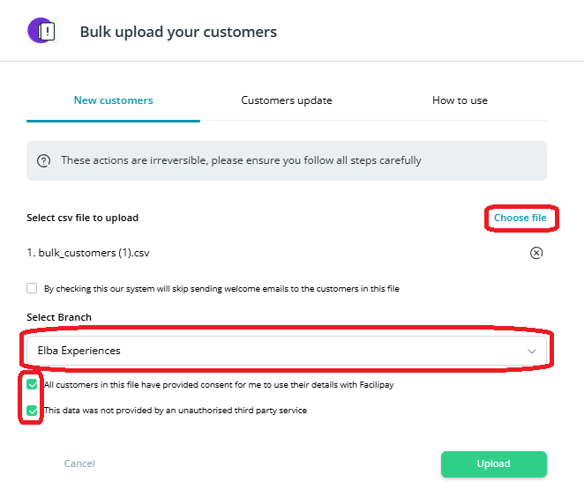
Upload the File
- Return to the Facilipay Dashboard
- Go to Customers Update
- Click Choose File and select your completed CSV
-
Confirm and Submit
- Select the branch for the upload
- Tick both acknowledgement boxes
- Click Save
Note: All transactions must be assigned to a branch.
What Happens After You Save
New customer accounts are created and uploaded to your Facilipay system, ready to transact and earn loyalty.
Tips & Best Practices
-
Validate emails first: Run a quick check on email format before uploading — bad addresses cause errors.
-
Test with a small batch: If unsure, upload 5–10 records first to confirm formatting.
-
Need help? For upload issues, contact support@facilipay.io.