
Before You Begin
- You must be logged into the Facilipay Business Dashboard with permission to manage orders and refunds.
- Decide whether the refund should go back to the customer's original payment card or to their account balance for future use.
Step-by-Step: Cancel an Online Order
-
Open the Orders Report
From the Facilipay Dashboard, select Reporting, then click Orders from the dropdown menu.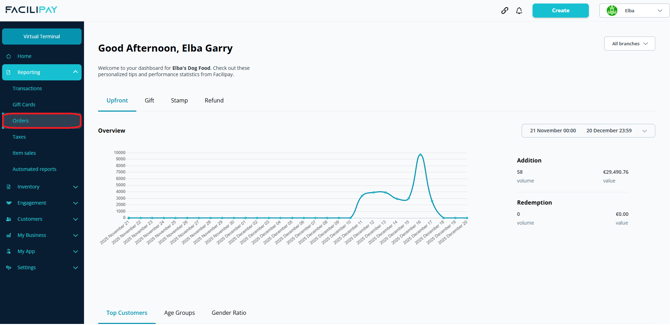
-
Locate the Order
A list of recent online orders will display. Select the order you wish to cancel. -
Review the Order Details
The order summary appears in a pop-up window. Locate the Refund Order button in the bottom-left corner.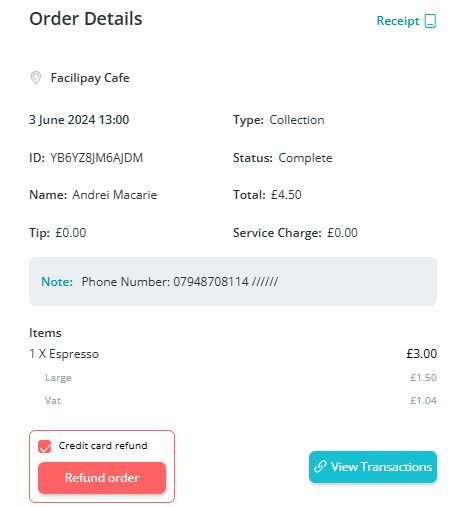
-
Select the Refund Method
Before confirming the refund, choose how the funds should be returned:- Tick the box to refund back to the customer's original payment card.
- Leave the box unticked to refund the amount to the customer's account balance for future use.
Once chosen, click Refund Order.
-
Confirm Cancellation
A confirmation message will appear indicating the order is being cancelled. The order is removed from the upcoming orders list and the customer automatically receives an email confirming the cancellation.
What Happens After You Cancel
-
The order disappears from the upcoming orders list immediately.
-
The customer receives an automated cancellation email.
-
The refund is processed via the method you selected.
Tips & Best Practices
-
Confirm before refunding: Refunds cannot be reversed — double-check the order before clicking Refund Order.
-
Communicate with the customer: If the cancellation is unusual, follow up with the customer directly to explain.
-
Need help? For refund issues, contact support@facilipay.io.