
Before You Begin
- You'll need access to the Facilipay app or member website.
- Have your account password ready — you'll need it to confirm cancellation.
Step-by-Step: Cancel Your Account
-
Open your app or Website
- Launch your app on your smartphone or tablet, or go to member.facilipay.io.
- Tap or click the Profile icon in the top-right corner of the screen.
-
Access Your Profile Settings
On the account page, tap or click the Profile option to view your customer details and account settings.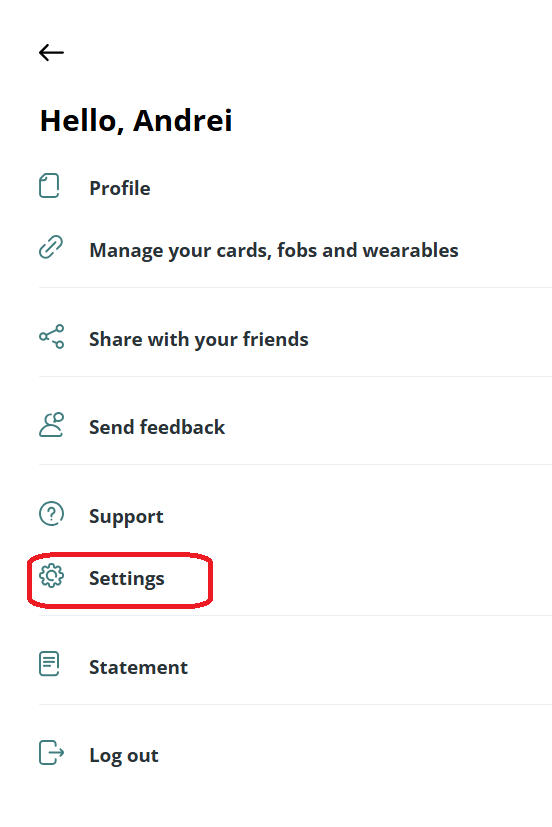
-
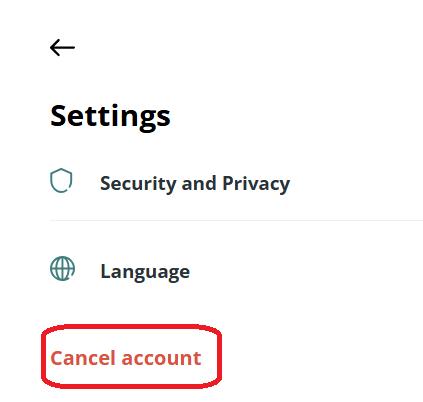
Cancel Your Account
- Scroll to the Cancel Account option and tap or click it.
- Enter your account password when prompted to confirm the cancellation.
What Happens After You Cancel
Your account is deactivated following confirmation of your request. You'll no longer have access to the app or any associated balances or rewards.
Tips & Best Practices
-
Use any remaining balance first: Once cancelled, balances may not be recoverable.
-
Save important info: Note any transaction history or receipts you might need before cancelling.
-
Need help? If you have questions, contact support@facilipay.io.