
Before You Begin
- You must be logged into the Facilipay Dashboard with admin access.
- Decide which loyalty model and reward structure suits your business before making changes.
Step-by-Step: Update Loyalty Settings
-
Log In to the Dashboard
Go to facilipay.io and log in to your Facilipay Dashboard. -
Open Loyalty Settings
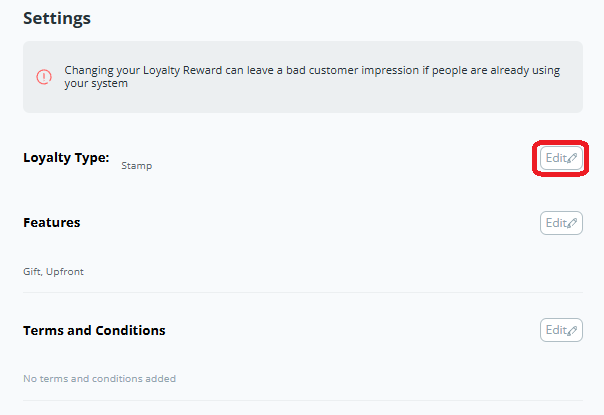
Click on Engagement and click Loyalty. You'll see your current loyalty configuration. Click Edit to make changes.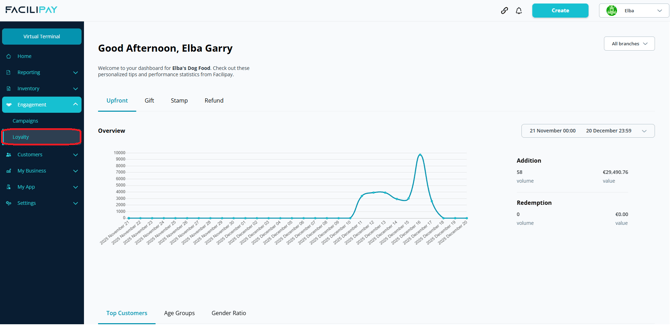
-
Select Your Loyalty Type
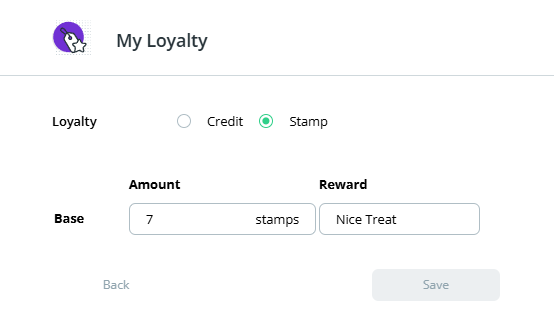
Choose or modify your loyalty type:- Stamp Loyalty — e.g. 9 stamps required to receive a free item on the 10th visit.
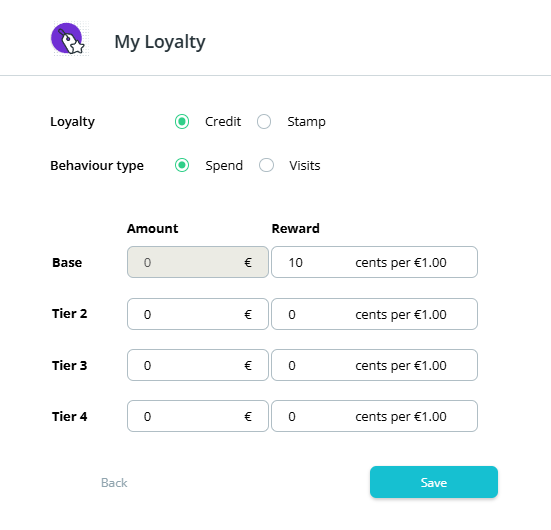
- Credit Loyalty — reward customers based on the value they spend.
The settings displayed change depending on the loyalty type selected.
-
Update the Configuration
Click the circle beside your preferred option, adjust the loyalty settings as needed, then click Save. -
Refresh Your POS
To ensure the changes apply to your POS device, refresh the Facilipay app on your POS and confirm the updated loyalty settings are visible.
What Happens After You Save
-
The new loyalty configuration is active immediately for all qualifying transactions.
-
Customers will start earning rewards under the new structure on their next purchase.
-
You can return to Engagement → Loyalty at any time to make further adjustments.
Tips & Best Practices
-
Communicate changes: Let staff and customers know when loyalty rules change to avoid confusion at the till.
-
Review regularly: Revisit loyalty settings periodically to ensure they continue to reflect your business goals.
-
Need help? For further assistance, contact support@facilipay.io.