
Before You Begin
- You must be logged into the Facilipay Dashboard with admin access.
- The Experiences branch must already be configured.
Step-by-Step: Create a Category
-
Create a New Category
From the Facilipay Dashboard, click Create in the top right corner of the homepage. Select Categories.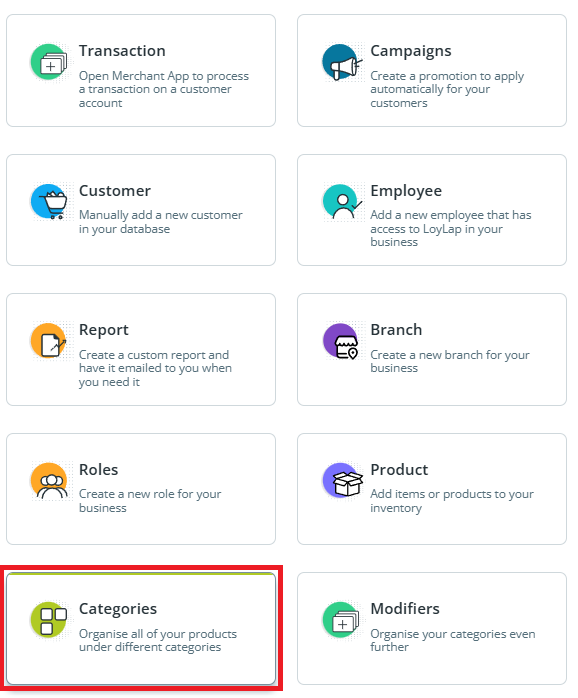
-
Assign the Category to a Branch
From the Branch dropdown, select the Experiences branch.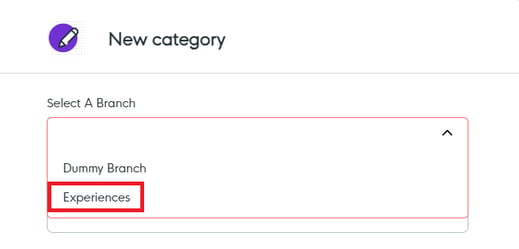
-
Enter Category Details
Complete the following fields:- Name – Used internally to manage and identify the category.
- Sort Order – Determines the order in which categories appear on the Experiences page (starting from 1).
-
Set Availability
Ensure the following options are enabled:- Available for Ordering
- Always Available
This ensures the experiences assigned to the category will be visible to customers. Click Save.
What Happens After You Save
The new category is created and ready for experiences to be assigned within your Experiences store.
Tips & Best Practices
-
Use descriptive names: Customer-friendly category names improve navigation.
-
Plan sort order: Most popular categories should appear first.
-
Need help? For category queries, contact support@facilipay.io.