
Before You Begin
- You must be logged into the Facilipay Business Portal with admin access.
- Decide on the role name and any pricing modifiers you want to apply before you start.
Step-by-Step: Create a Customer Role
-
Log In to the Business Portal
Sign in to the Facilipay Business Portal. -
Open the Create Menu
Click Create in the top-right corner of the dashboard. -
Select Roles
From the options displayed, select Roles.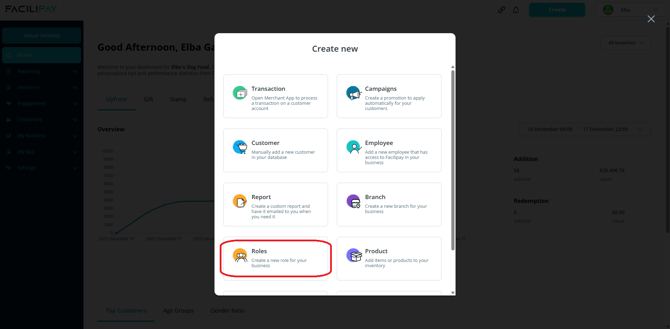
-
Configure the Role
Enter a name for the role and configure the Transaction Modifier if needed.Tip: If you don't want the role to change product prices, set the Transaction Modifier to 1.
-
Save the Role
Click Save to create the role.
Step-by-Step: Assign the Role to a Customer
-
Navigate to Customers
After saving the role, go to Customers.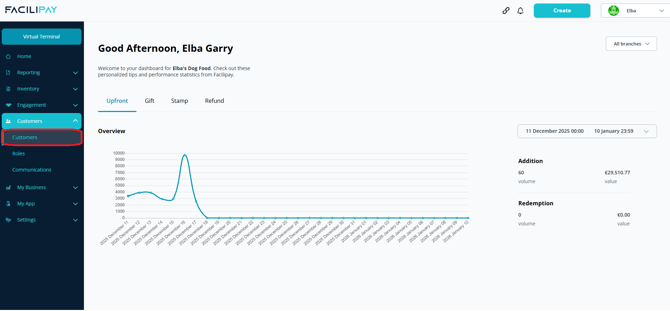
-
Find the Customer
Use the search bar to locate the customer you want to assign the role to. -
Edit the Customer
Click the three-dot menu beside the customer's name and select Edit.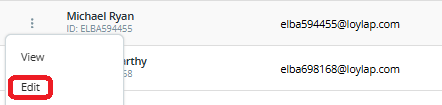
-
Apply the Role
Under the Role dropdown, select the role you created. -
Save the Change
Click Save to assign the role to the customer.
What You Can Do With Roles
-
Target specific customer groups with tailored campaigns
-
Apply pricing rules (e.g. staff or student discounts) automatically
-
Segment your customer base for analysis and reporting
Tips & Best Practices
-
Use clear role names: Choose names that are easy to recognise (e.g. "VIP", "Staff", "Student") for accurate filtering.
-
Audit role assignments: Review who is in each role periodically — especially for staff roles when employees leave.
-
Test before going live: If using a Transaction Modifier that affects pricing, test with a sample transaction first.