
Before You Begin
- You must be logged into the Facilipay Dashboard with admin access.
- Confirm the tax rates that apply to your products before you start — consult your accountant if unsure.
Step-by-Step: Create a Tax Rate
-
Open Branch Settings
Log in to the Facilipay Dashboard, click My Business, then select Branches.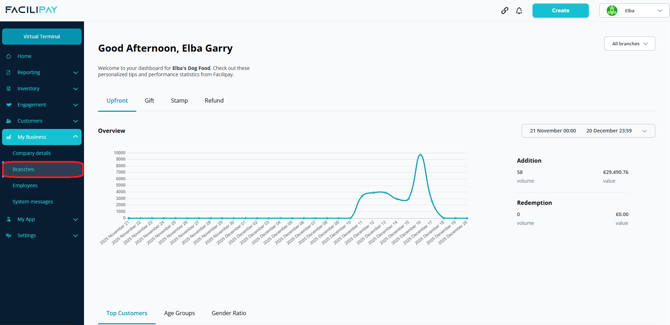
-
Select a Branch
Click the three dots next to the branch you want to update. -
Open Tax Settings
Click Taxes in the top menu, then click New Tax.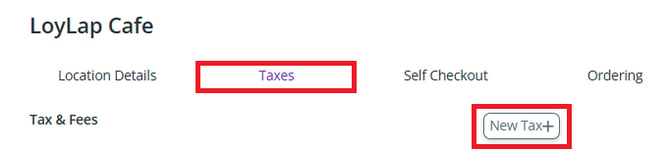
-
Configure the Tax Rate
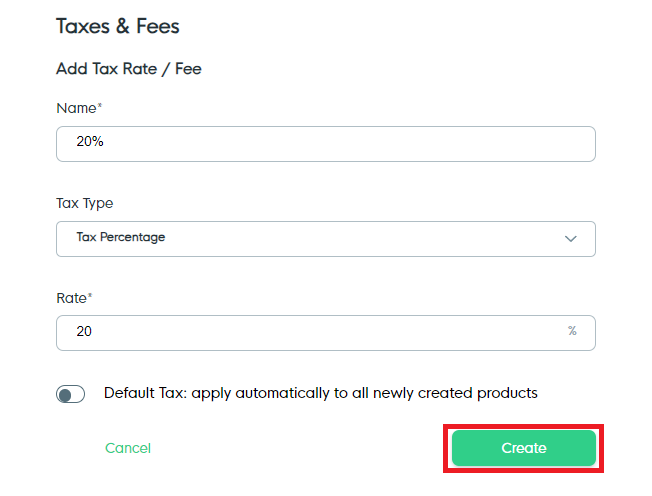
Set the following:- Active: Toggle on to enable the tax rate
- Name: Enter a name for easy identification
- Tax Type: Choose Flat fee or Percentage
- Rate: Enter the value (amount or percentage)
- Default (optional): Enable to automatically apply this tax to new products
Click Create to save.
What Happens After You Save
The new tax rate is created and ready to be assigned to your products. You can now apply it to existing or new items in your inventory.
Tips & Best Practices
-
Use clear names: Tax names like "VAT 20%" or "Reduced Rate 5%" help avoid confusion.
-
Audit periodically: Tax rates change — review them at least once a year or when legislation changes.
-
Need help? For tax configuration questions, contact support@facilipay.io.