
Before You Begin
- You must be logged into the Facilipay Dashboard with admin access.
- Have a list of fixed locations (e.g. table numbers, room numbers) ready before configuring.
Step-by-Step: Configure Fixed Delivery
-
Open Branch Settings
From the Facilipay Dashboard, go to My Business > Branches.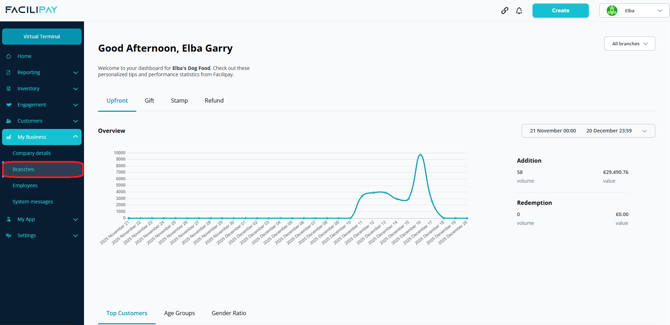
-
Edit the Branch
For the branch in question, click the three-dot icon and select Edit. -
Open Fixed Delivery Settings
Navigate to Ordering > Fixed Delivery and click Edit.
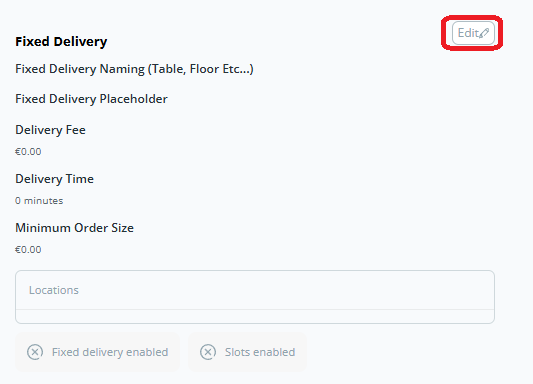
-
Enable Fixed Delivery
Toggle Fixed Delivery on. -
Add Location Details
Add details such as locations (table numbers), delivery times, locations and any other configuration required. -
Save Your Changes
Save your changes — customers will now be able to select these fixed locations when placing orders.
What Happens After You Save
Customers see the available fixed locations during checkout (e.g. table numbers) and can select where their order should be delivered within the venue.
Tips & Best Practices
-
Use clear labels: Use easy-to-understand labels like "Table 1", "Table 2" so customers know what to choose.
-
Train staff to recognise locations: Make sure team members know how to identify table numbers when fulfilling orders.
-
Test the experience: Place a test order to confirm the location flow works end-to-end.