
Before You Begin
- You must be logged into the Facilipay Business Portal with admin access.
- You should have your delivery radius, fee, and prep time decisions ready before configuring.
Step-by-Step: Enable Delivery
-
Log In to the Business Portal
Sign in to the Facilipay Business Portal. -
Go to Branches
From the dashboard, navigate to My Business → Branches.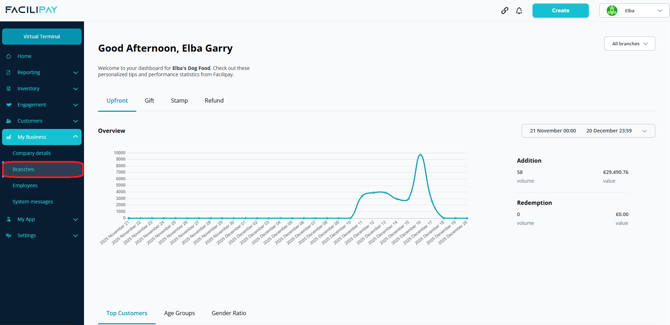
-
Open Branch Settings
Click the three-dot menu beside the branch you want to enable delivery for. -
Open Ordering Settings
On the branch details page, select Ordering.
-
Open the Delivery Tab
Click the Delivery tab in the top menu, then click Edit to open delivery settings.
-
Enable Delivery
Toggle Delivery Enabled so the switch turns on (green). -
Configure Delivery Settings
Configure any additional delivery settings as required (delivery fee, time, radius). -
Save Your Changes
Click Save.
What Happens After You Save
Customers can now select delivery as their dispatch method when placing orders online. Orders flow into your dashboard for fulfilment.
Tips & Best Practices
-
Configure your radius first: Set the delivery radius before going live to avoid orders from outside your service area.
-
Plan driver capacity: Make sure you have the staff and vehicles ready to fulfil delivery demand.
-
Test the flow: Place a test delivery order to confirm the customer experience works end-to-end.