
Before You Begin
- You must be logged into the Facilipay Business Portal with permission to view and export customer data.
- If you only need a specific segment, apply filters in the portal before exporting to reduce file size.
Step-by-Step: Export Your Customer List
-
Log In to the Business Portal
Go to the Facilipay Business Portal and sign in with your business credentials. -
Go to the Customers Section
From the side navigation menu, click Customers -> Customers to view your full customer database.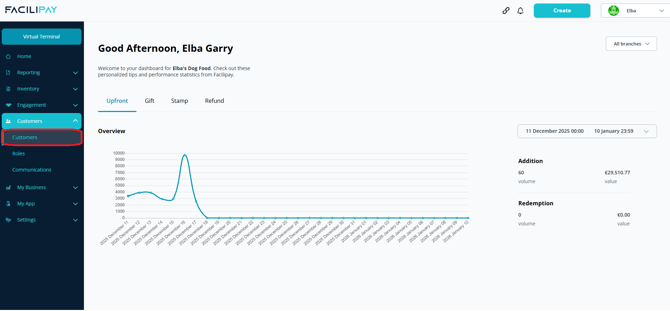
-
Click Export
In the top-right corner of the customer list screen, select Export. The system will begin preparing your file.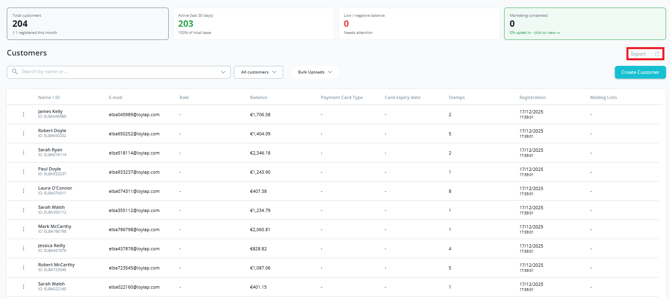
-
Download the File
Once processed, a CSV file will download automatically to your device. -
Open and Review
Open the file in Excel or Google Sheets to review your customer data, including names, email addresses, account status, balances, and other account details.
What's Included in the Export
-
Customer names and email addresses
-
Account balance and credit information
-
Linked account identifiers
-
Other customer-specific details stored in the Facilipay system
Tips & Best Practices
-
Handle data responsibly: Customer export files contain personal information — store and share them in line with your privacy policies and applicable data protection laws.
-
Export regularly: Scheduled exports support reconciliation, backups, and offline analysis.
-
Check your permissions: If the Export button is not visible, confirm your user role has permission to export data, or contact your account administrator.
Troubleshooting
-
Confirm you are in the Customers section of the Facilipay portal — the Export option only appears here.
-
Check that your user role has permission to export data.
-
If the issue persists, contact support@facilipay.io for assistance.