
Before You Begin
- You must be logged into the Facilipay Dashboard with admin access.
- Identify the branch whose devices you want to review.
Step-by-Step: Locate Your Devices
-
Log In to the Dashboard
Sign in to your Facilipay Dashboard. -
Open Branch Settings
Click My Business, then select Branches. -
Select a Branch
Click the three dots next to the branch and select Details.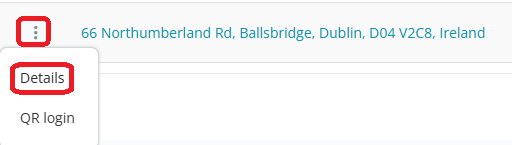
-
Open the Devices Tab
Click Terminal ID in the top menu of the branch details page. -
Review Device Information
You'll see a list of devices associated with the branch, including:- Terminal ID — useful for reporting and troubleshooting
- App Name
- Device Model / Name
- Serial Number
- Date Added
Tips & Best Practices
-
Note your Terminal IDs: Having Terminal IDs to hand makes troubleshooting and support requests much faster.
-
Audit periodically: Review the device list regularly to ensure all listed devices are still in active use.
-
Need help? If a device is missing or showing incorrect details, contact support@facilipay.io.