
Before You Begin
- You must be logged into the Facilipay Business Dashboard with billing access.
- Have your new payment card details ready if you plan to update them.
Step-by-Step: Locate and Update Your Payment Card
-
Log In to the Business Dashboard
Sign in to the Facilipay Business Dashboard using your business credentials. -
Open Your Account Menu
Click your name in the top-right corner of the dashboard to open the account menu. -
Go to Billing
Select Billing from the dropdown to open your billing settings.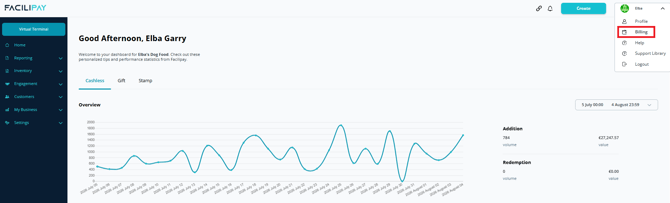
-
Review Your Billing Details
From the Billing screen you can view your:- Current plan
- Payment method on file
-
Update Your Payment Method
To replace the card on file, click Change next to your existing payment method.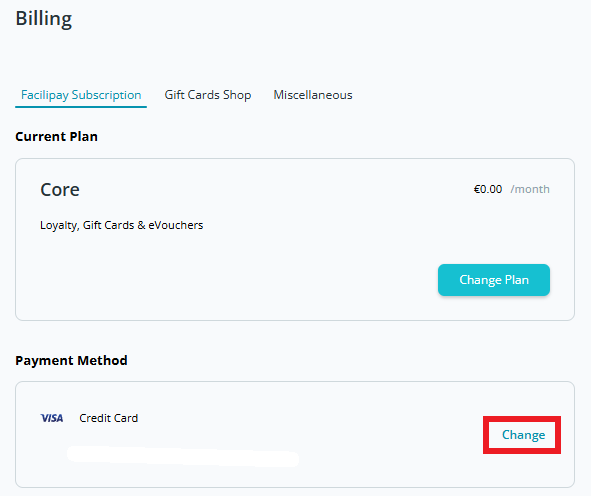
-
Enter the New Card Details
Fill in your new card number, expiry date, and security code. -
Save Your Changes
Click Save to apply the update. Your new payment method will be used for all future charges.
What Happens After You Save
-
Your billing details are updated immediately.
-
Future invoices will be charged to the new payment method.
-
You can return to the Billing section at any time to review or change your card again.
Tips & Best Practices
-
Update before expiry: Replace your card before its expiry date to avoid any disruption to your Facilipay services.
-
Keep details current: Notify your finance team if there are any changes to billing contacts or payment cards used for the business.
-
Need help? If you have any issues updating your payment method, contact support@facilipay.io.