
Before You Begin
- You must be logged into the Facilipay Business Portal.
- Your user account must have billing permissions to change the plan.
Step-by-Step: Change Your Plan
-
Log In to the Business Portal
Sign in to the Facilipay Business Portal with your business credentials. -
Go to Billing
Click your profile icon in the top-right corner of the screen and select Billing from the dropdown.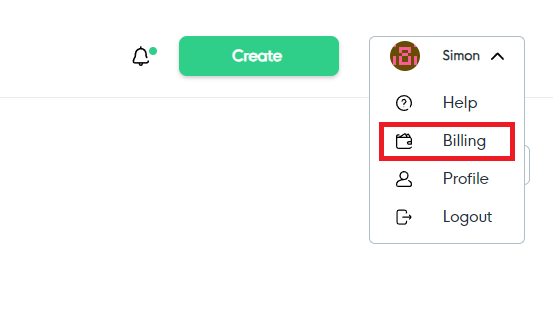
-
Open Change Plan
On the Billing page you will see your current plan and its associated cost. Click Change Plan to view available plan options.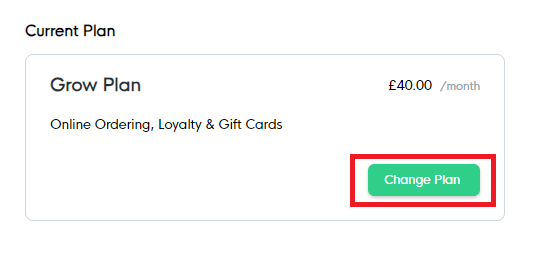
-
Select a New Plan
A list of available plans — including pricing and features — will be displayed. Find the plan you want and click Select. -
Confirm Your Change
Once selected, your new plan will take effect immediately. The pricing difference will be reflected on your next invoice.
What Happens After You Change Plans
-
The new plan is active straight away, and any new features become available immediately.
-
Any change in cost is reflected from your next billing cycle.
-
You can return to Billing at any time to adjust your plan again.
Tips & Best Practices
-
Compare features before switching: Review which features are included on each plan to make sure you're picking the right fit for your business.
-
Consider upcoming campaigns: If you have a major campaign or busy season ahead, changing plans beforehand ensures you have the right tools in place.
-
Need help choosing? If you have questions about which plan is right for your business, contact support@facilipay.io.