
Before You Begin
- You must be logged into the Facilipay Dashboard with admin access.
- Have your reward type and any limits decided before starting.
Step-by-Step: Create the Birthday Campaign
-
Open the Campaign Creator
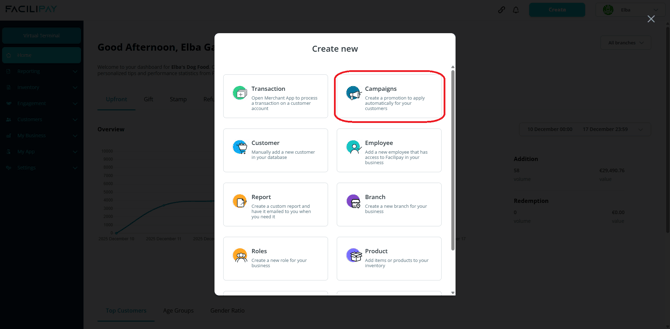
From the Facilipay Dashboard, click the Create icon (top right) and select Campaigns from the options.Optionally navigate to Engagement > Campaigns > Create.
-
Begin Setup
Click Targeted.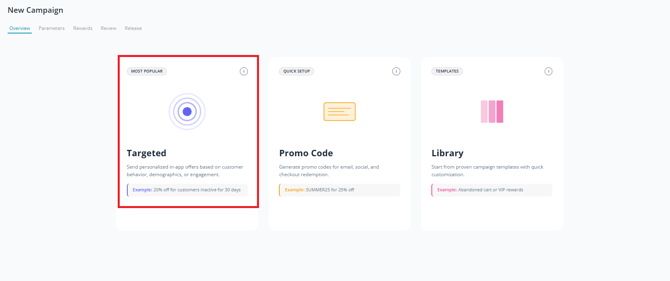
-
Add Campaign Overview
Under the Overview tab, add details that define the foundation of the campaign:- Name: The campaign title
- Description: Brief description for customers
- Terms and Conditions: As per business requirements
Note: These are customer-facing and may be updated before or after publication.
-
Set Schedule and Limits
Scroll down to find parameters for scheduling and applying limits. For a birthday campaign, you can leave the schedule open (campaign runs indefinitely) if preferred. Click Next. -
Define Birthday Filter
Under Parameters, select New customer demographic filter and select Birthday. Set whether the reward applies on the customer's birthday, week of, or month of their birth date.Click Save and Next.
-
Set the Reward
Under Rewards, select one of three reward types:- Discount sale: Reward a discount of X if they spend more than Y
- Credit back: Grant the customer a credit back on the purchase
- Discounted product/category: Give a discount on a specific product or category
Click Save and Next.
-
Configure Notifications (Optional)
If you have a branded app, optionally enable push notifications under Notifications. -
Review and Publish
Review the campaign and publish.Optional: Copy and share the URL on social media to promote the campaign.
What Happens After You Publish
Your birthday campaign goes live. Eligible customers automatically qualify for the reward when their birthday (or week/month) falls within the configured period.
Tips & Best Practices
-
Make it feel special: A free or significantly discounted item creates a memorable birthday moment.
-
Limit usage: Cap to one redemption per customer per year.
-
Promote the reward: Push notifications on the day boost redemption rates.