
Before You Begin
- Locate the guest's current reservation before starting.
Step-by-Step: Post a Deposit
- Locate the Reservation Locate the current reservation.
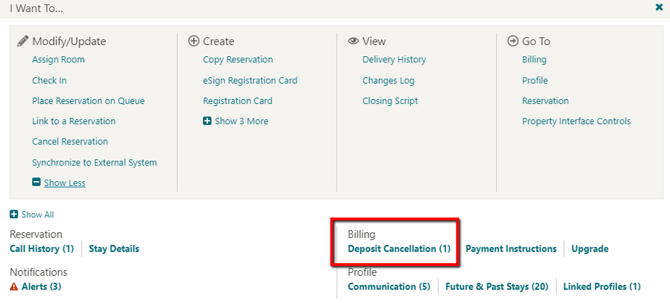
- Open Deposit Cancellation Click I Want To, then select Deposit Cancellation.
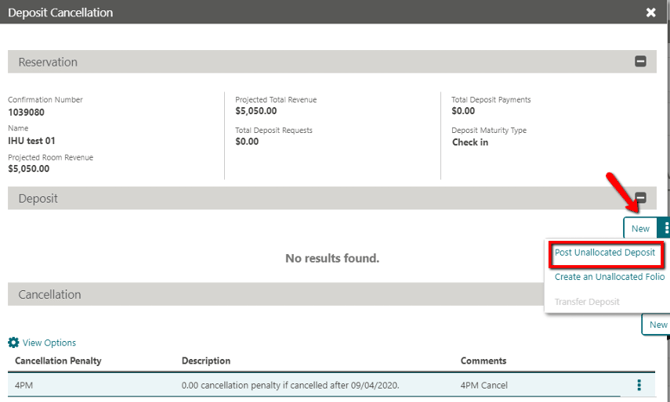
- Start a New Deposit Click New and select Post Unallocated Deposit.
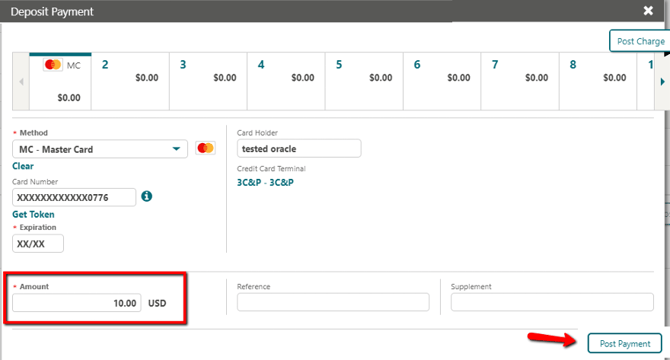
- Enter the Amount Enter the deposit amount in the Amount field.
- Post the Payment Click Post Payment.
Tips & Best Practices
- Check the processing confirmation: The Payment Processing screen displays, and the deposit then appears in the guest's reservation as a posted deposit.
- Confirm the deposit maturity type: Review whether the deposit is due on booking, check-in, or another date before posting.
- Need help? For deposit posting issues, contact your Payment Service Provider.