
Before You Begin
- Locate the guest's reservation.
- Payments during the stay can be made at any time from the billing screen.
Step-by-Step: Post a Payment During the Stay
- Locate the Reservation Locate the guest.
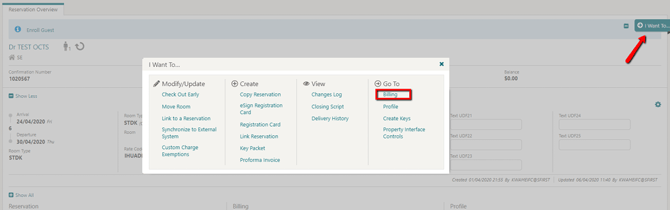
- Open Billing Select the I Want To option to the right of the screen, then click Billing.
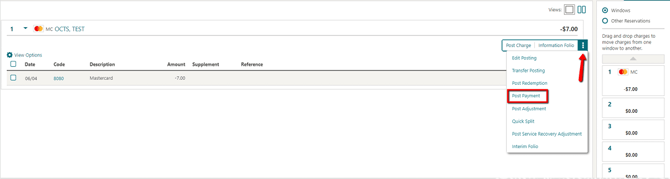
- Open Post Payment Click the ellipsis to the right of the screen and select Post Payment.
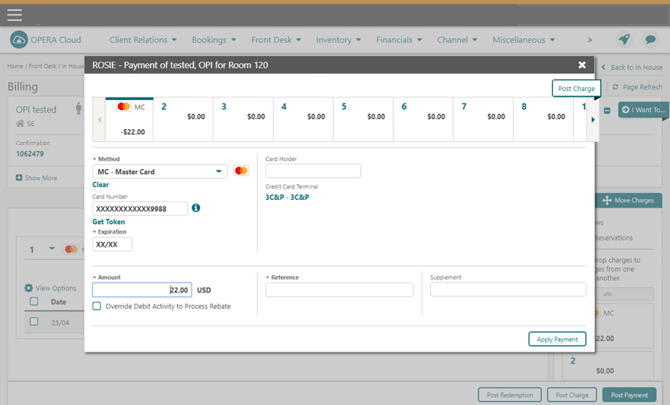
- Enter the Amount Enter the desired amount to be charged.
- Apply the Payment Click Apply Payment.
Tips & Best Practices
- Review before applying: Check the displayed card details (method, card holder, terminal) before applying the payment, especially if using a newly presented card.
- Confirmation shown on the payment screen: Once processed, the payment appears with a posted status, amount, and the option to Print Receipt.
- Need help? For in-house payment issues, contact your Payment Service Provider.