
Before You Begin
- You must have access to Oracle OPERA Cloud with billing permissions.
- Have your Cashier ID and PIN ready.
- Confirm the reload amount with the customer before processing.
Step-by-Step: Reload a Prepaid / Gift Card
Open Billing
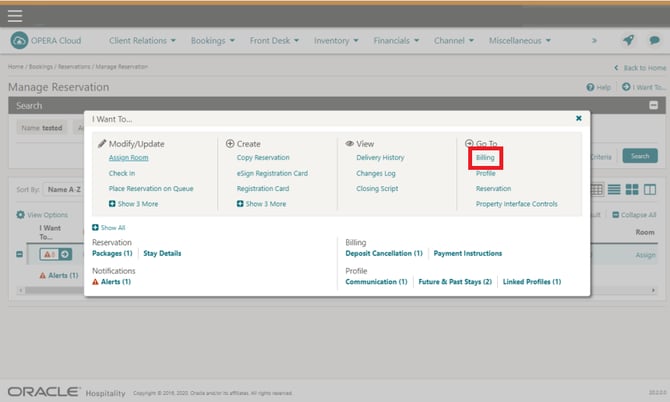
Click I Want To... | Billing.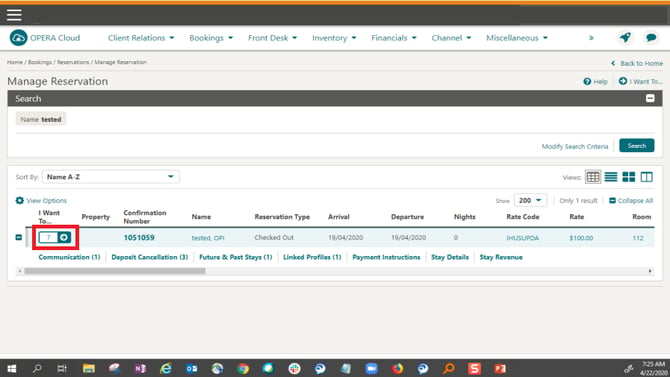
Enter Your Credentials
If prompted:- Select the Cashier ID
- Enter your PIN
- Click Login
The Billing Information screen appears.
Open Prepaid Card Details
Click the Prepaid Card details link. The Prepaid Cards screen appears.Select the Card to Reload
Select a card, click the vertical ellipsis, and click Manage. The Prepaid Card information screen appears.Click Reload Card
Click Reload Card. The Reload Prepaid Card screen appears.Enter the Reload Amount
In the Amount field, enter the reload amount.Make Payment
Select Make Payment: choose Cash as the payment method to pay for the prepaid card reload at the time of reload.Confirm the Reload
Click Reload Card.
What Happens After You Reload
The reload amount is added to the gift card balance, and the customer can use the new balance immediately.
Tips & Best Practices
Confirm the amount: Always verify the reload amount with the customer before completing.
Document reloads: Keep a brief record of reloads for reconciliation.
Need help? For OPERA-related queries, contact support@facilipay.io.