
Before You Begin
- You must be logged into the Facilipay Business Portal with access to reporting.
- Confirm you have the correct date range or branch details you want to view and export.
Step-by-Step: View Your Orders
-
Log In to the Business Portal
Sign in to the Facilipay Business Portal in your browser. -
Go to Reporting → Orders
In the left navigation, click Reporting, then select Orders. This opens the online order report for the current month by default.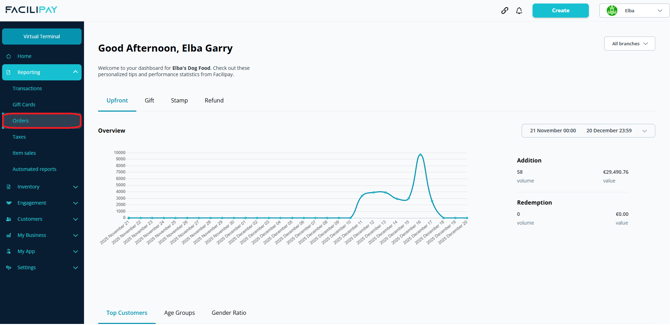
-
Apply Filters
Use the available filters (such as date range, branch/location, or order status) to narrow the list to the orders you want to view or export.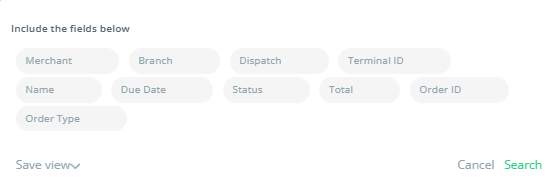
-
Review Orders On Screen
Scroll through the filtered list to check the order details — including customer, total value, and dispatch type (delivery, collection, etc.).
Export Your Orders
Once you have the desired order list on screen:
-
Click Export
In the top right corner of the Orders report, click the Export button.
-
Download the CSV File
Facilipay will prepare and download a CSV file containing the filtered orders. -
Open and Use Your Export
Open the CSV in Excel, Google Sheets, or another spreadsheet tool to view, sort, or analyse order data.
Tips & Best Practices
-
Narrow your date range: Use shorter date ranges (e.g. daily or weekly) to break up large exports for easier analysis.
-
Use filters strategically: Filter by branch, order type, or status before exporting to reduce file size and focus on what matters.
-
Keep records: Regularly export order data for bookkeeping and audit trails.
What You Can Do With Your Export
-
Analyse sales by product, day, or customer segment
-
Reconcile online order reports with accounting systems
-
Share ordering trends with your team
-
Create custom dashboards or summaries for business reviews