
Before You Begin
- You must be logged into the Facilipay Business Portal with admin access.
- Decide on the days and time ranges when the product should be available before configuring.
Step-by-Step: Restrict a Product by Time
-
Open Inventory → Products
Log in to the Facilipay Business Portal and navigate to Inventory → Products.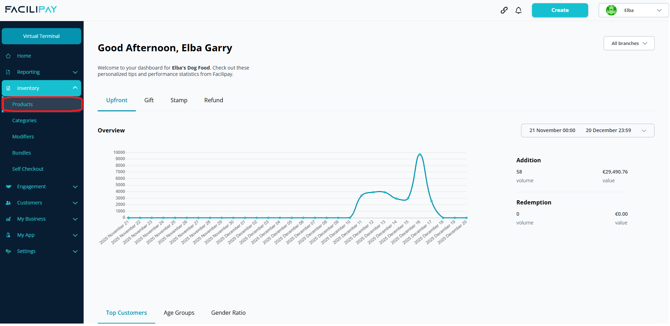
-
Select the Product
Choose the product you want to modify. -
Open Availability Settings
Scroll down to the availability settings for the item. -
Turn Off "Always Available"
Toggle Always Available off (the toggle should appear grey).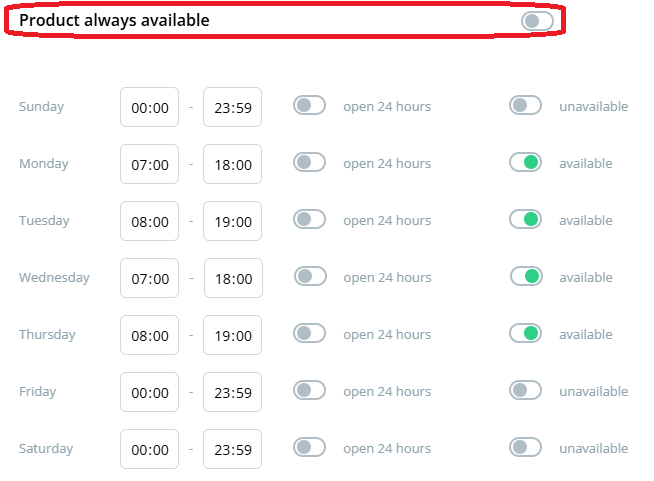
-
Set the Schedule
A weekly schedule will appear. Select the days of the week and time range when the item should be available for ordering. -
Confirm Online Visibility
Ensure Available for Ordering is enabled so the product appears on the customer-facing menu. -
Save Your Changes
Click Save to apply.
What Happens After You Save
The product only appears in the online menu during the selected time windows. Outside those hours, customers will not see the item.
Tips & Best Practices
-
Synchronise with Clover: After making changes, press Synchronise if you want updates to appear immediately on your Clover device.
-
Match opening hours: Ensure product availability aligns with the branch's overall opening hours.
-
Test the customer view: Check your ordering page during and outside the scheduled times to confirm the rules work as expected.