
Before You Begin
- You must be logged into the Facilipay Dashboard with access to customer records.
- Have the Member's name, email, or account number ready to locate their record.
What Personal Data Is Held
The following personal information is stored against a Member's account:
- Name
- Email address
- Phone number
- Registration date
- Date of birth
- Gender
The following transactional data is also stored:
- Transaction history
- Associated branch locations
Step-by-Step: Retrieve Member Data
-
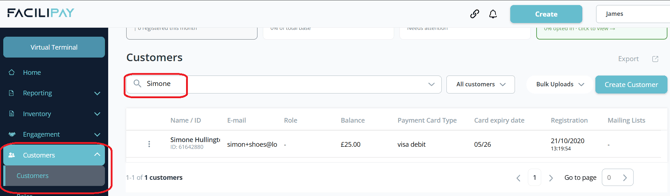
Find the Member
From your Facilipay Dashboard, search for the Member within the Customers section.
-
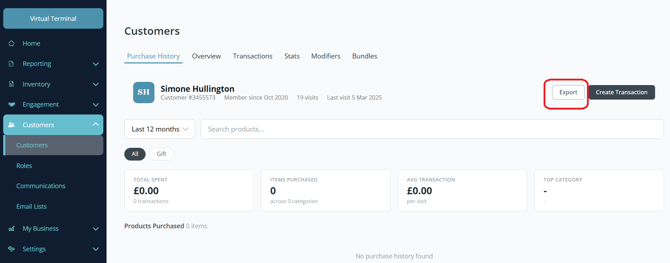
Review and Export the Data
Open the Member's record, review the relevant data, and export it as required for sharing.
Member Data Deletion Requests
If a Member requests to have their data deleted from Facilipay, please instruct them to contact support@facilipay.io directly. This ensures the deletion request is processed securely and in line with data protection requirements.
Tips & Best Practices
-
Respond promptly: Data subject requests are often subject to legal time limits (for example, 30 days under GDPR) — act on them quickly.
-
Share securely: Use secure channels (encrypted email or password-protected files) when sharing personal data back to the Member.
-
Keep records: Document each request and how it was handled to support compliance audits.