
Before You Begin
- You must be logged into the Facilipay Dashboard with admin access.
- Your kitchen or receipt printer must be set up and connected.
Step-by-Step: Configure Print Timing
-
Open Branch Settings
Log in to the Facilipay Dashboard, click My Business, then select Branches.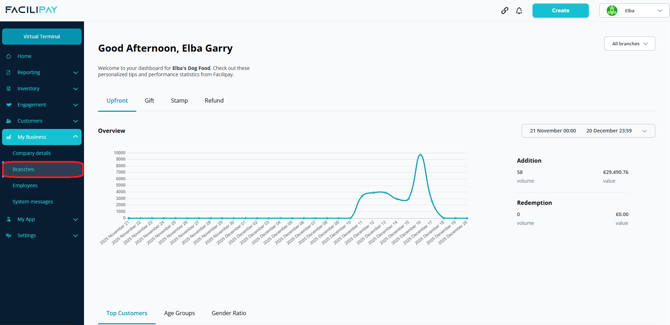
-
Select a Branch
Click the three dots next to the branch you want to edit, then select Details. -
Open Ordering Settings
Click Ordering in the top menu, then click Edit.
-
Set Print Timing
Scroll to Order Print Timing. Choose one of the following options:-
Immediately — Orders print as soon as they are received.
-
Prep Time & Immediately — Orders print immediately, and a second print is triggered based on your prep time (e.g. 20 minutes before the scheduled fulfilment time).
Click Save.
-
What Happens After You Save
Orders will print according to your selected timing. Kitchen staff can plan workflow around when tickets arrive.
Tips & Best Practices
-
Use Immediately for live orders: When orders are placed for ASAP fulfilment, immediate printing is the most useful.
-
Use Prep + Immediately for scheduled orders: If customers schedule orders, the dual print pattern reminds the kitchen close to fulfilment time.
-
Test the timing: Place a test order to confirm prints land when expected.