
Before You Begin
- You must have access to the Facilipay Merchant Web App.
- Have the recipient's name, email address, gift amount, and any message ready.
Step-by-Step: Send a Digital Gift Card
-
Log In to the Merchant Portal
Go to merchant.facilipay.io and log in to your account. -
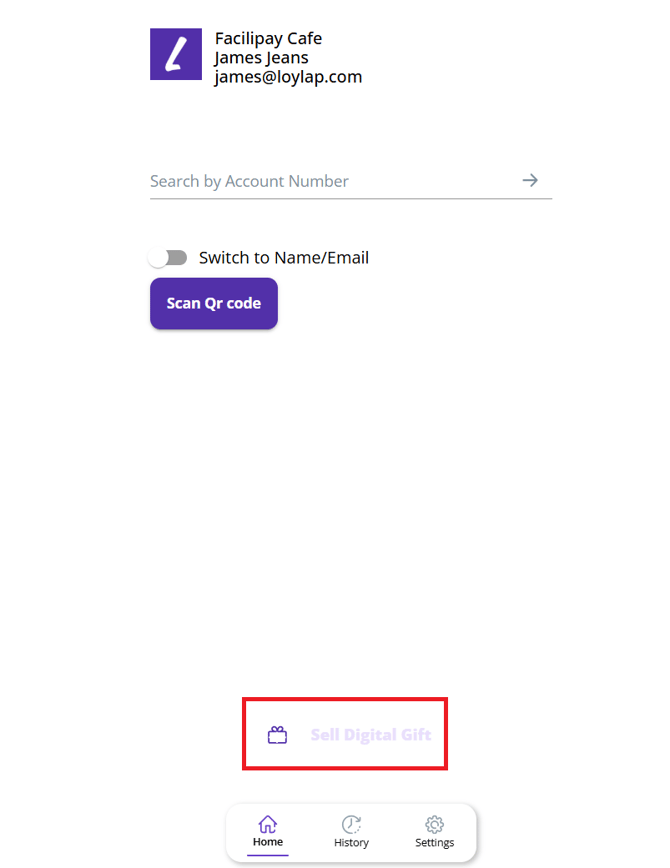
Select 'Sell a Digital Gift'
Once logged in, click on Sell a Digital Gift.
-
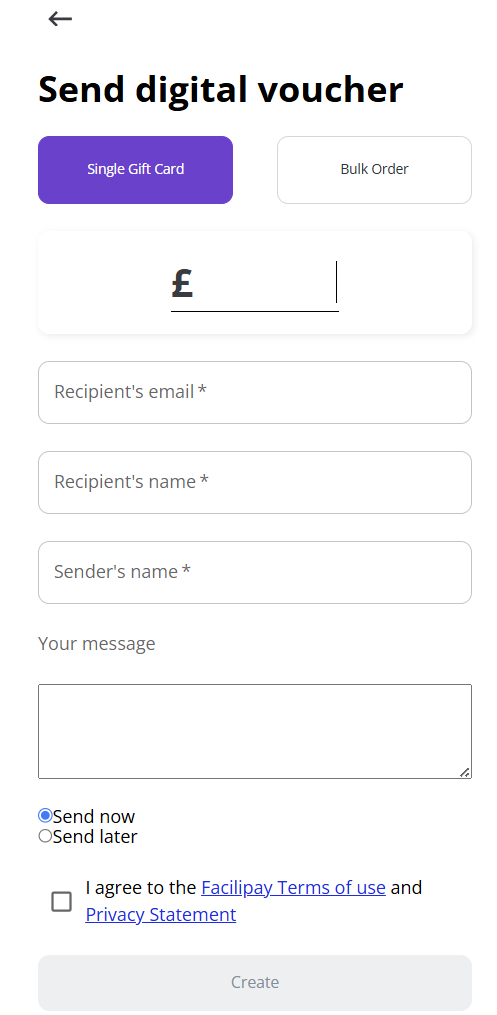
Enter Gift Card Details
Enter the required information:- Recipient details
- Sender name
- Optional message
- Gift card amount (if applicable)
Review the information to ensure accuracy before proceeding.
What Happens After You Send
The digital gift card is sent electronically to the recipient using the details provided. They'll receive an email with the gift card details and a QR code.
Tips & Best Practices
-
Verify the email: Confirm the recipient's email address before sending — typos delay delivery.
-
Personalise the message: A short personal message makes the gift feel more thoughtful.
-
Need help? For sending issues, contact support@facilipay.io.