
Before You Begin
- You must be logged into the Facilipay Dashboard.
- Decide which report you want to automate and which email addresses should receive it.
Step-by-Step: Configure an Automated Report
-
Open Create → Reports
In the Facilipay Dashboard, click Create in the top right corner and select Reports.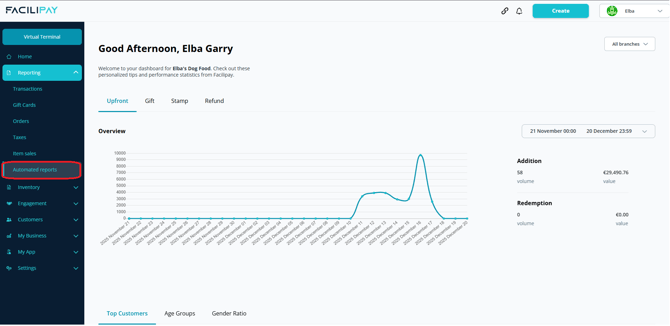
-
Configure the Report
Click Create Report, then Name the report, select the delivery frequency (daily, weekly, or monthly), and enter the email address(es) that should receive it.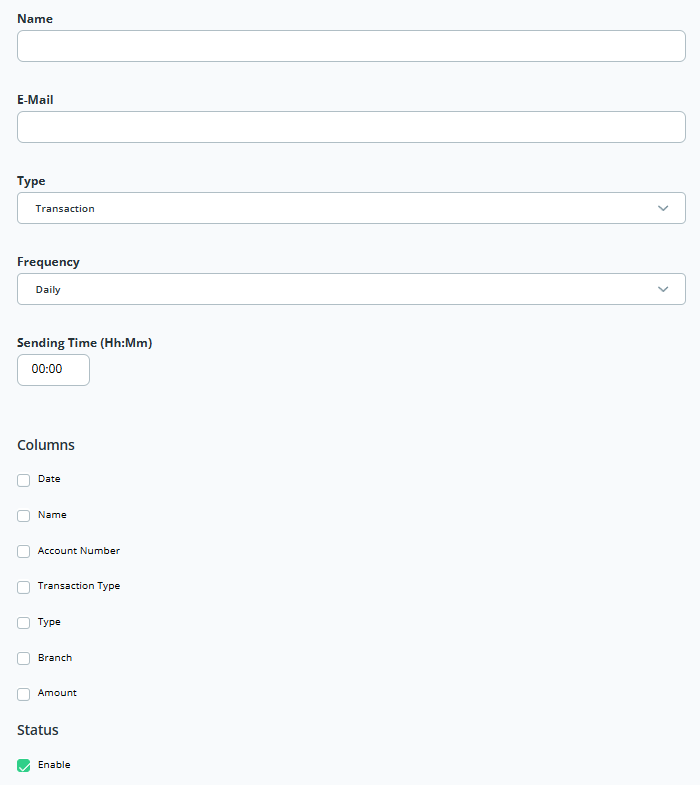
-
Save and Enable
Save the settings, then check Enable. The report will now be sent automatically on the chosen schedule.
Tips & Best Practices
-
Use a shared inbox: Send to a shared finance or operations inbox so multiple team members have visibility.
-
Match frequency to need: Use daily for high-volume operations, weekly or monthly for higher-level summaries.
-
Review and refine: Disable or update the schedule whenever your reporting needs change.