
Before You Begin
- You must be logged into the Facilipay Dashboard with admin access.
- Have your Stripe login credentials ready, or be prepared to create a new Stripe account during the connection.
Step-by-Step: Connect Stripe
-
Open Online Payments
From the Facilipay Dashboard, click on Settings in the side menu, then select Online Payments.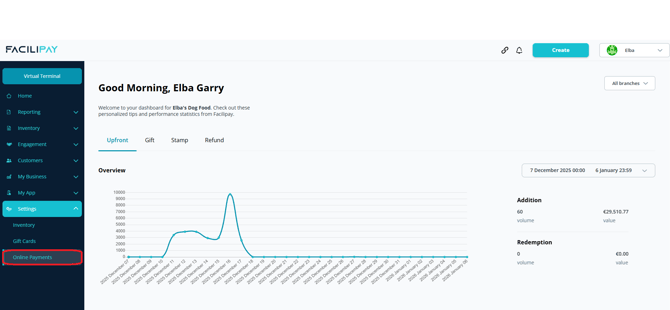
-
Connect with Stripe
On the Online Payments page, locate Stripe and click Connect with Stripe. You'll be redirected to Stripe to either:- Log in to an existing Stripe account, or
- Create a new Stripe account
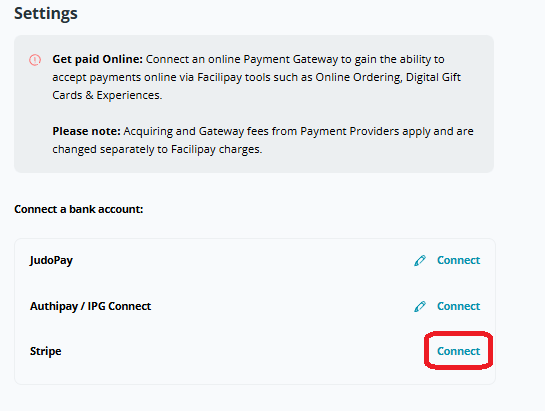
The Stripe setup process typically takes only a few minutes.
-
Complete Authorisation
Follow the on-screen prompts within Stripe to authorise the connection. Once complete, you'll be redirected back to the Facilipay Dashboard.
What Happens After Connection
-
Online payments are enabled for services such as Mobile Ordering and Digital Gift Cards.
-
Funds settle directly into the bank account linked to your Stripe account.
-
You can return to Settings → Online Payments at any time to review or change your connection.
Tips & Best Practices
-
Run a test transaction: Validate the integration with a small test purchase after connecting.
-
Keep your Stripe details secure: Use a strong, unique password for your Stripe account.
-
Need help? For any issues during setup, contact support@facilipay.io.