
Before You Begin
- You must be logged into the Facilipay Business Dashboard with admin access.
- Have your business details ready — you will be asked to submit them as part of the connection request.
- Setup typically takes around 10 business days, so allow time before any planned go-live.
Step-by-Step: Connect Judopay
-
Log In to the Facilipay Dashboard
Sign in to your Facilipay Dashboard using your business credentials. -
Open Online Payments
From the main menu, select Settings, then click Online Payments.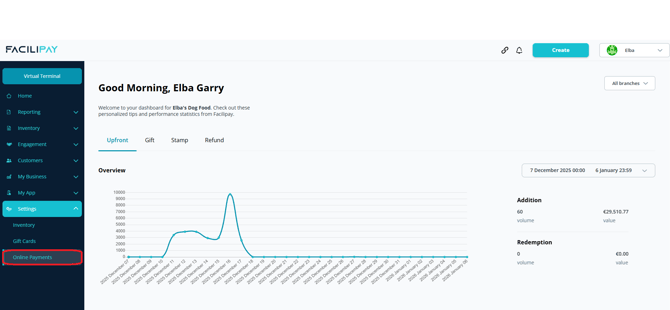
-
Select Judopay
On the Online Payments page, locate Judopay and click Connect (or Edit if you have started the process before).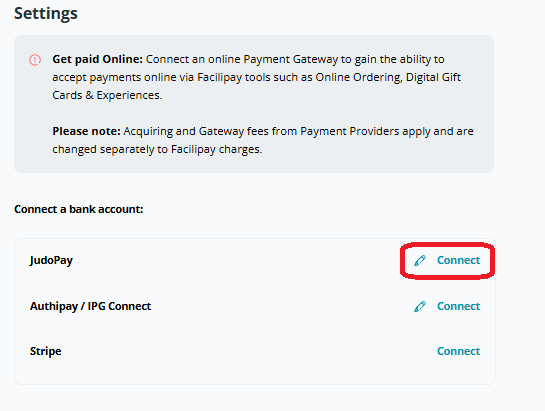
-
Submit the Required Information
Complete the form with your business details. This sends a request to Judopay to connect your Card Not Present Merchant ID (CNP MID) to the Judopay gateway. -
Wait for Judopay to Complete Setup
Once the form is submitted, Judopay support will be in touch to complete the setup. Provided all required documentation is supplied, setup typically takes around 10 business days.
What Happens After Connection
Once Judopay is fully connected, the following payment flows will process through Judopay and settle directly into your business bank account:
-
Customer online top-ups
-
In-app payments
-
Digital gift card purchases
Tips & Best Practices
-
Submit complete documentation: Setup delays are almost always caused by missing information. Double-check what Judopay requests before submitting.
-
Plan ahead of launches: If you are launching gift cards or app payments, kick off the Judopay connection at least two weeks beforehand.
-
Need help? For Facilipay-side questions, contact support@facilipay.io.