
Before You Begin
- You must be logged into the Facilipay Dashboard with admin access.
- Decide on the minimum value for each dispatch method before configuring.
Step-by-Step: Set a Minimum Order Value
-
Open Branch Settings
Log in to the Facilipay Dashboard, click My Business, then select Branches.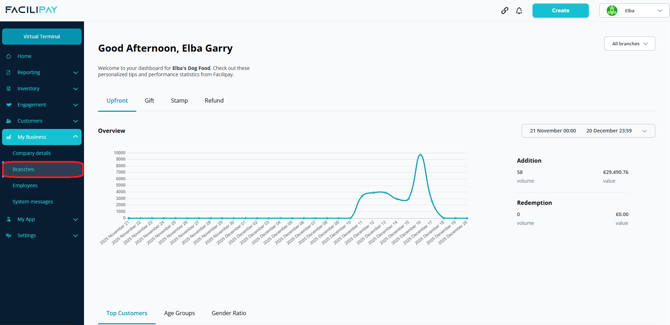
-
Select a Branch
Click the three dots next to the branch you want to edit, then select Details. -
Open Ordering Settings
Click Ordering in the top menu.
-
Select a Dispatch Method
Choose the dispatch method you want to update (e.g. Delivery or Collection) and click Edit. -
Set Minimum Order Value
Locate Minimum Order Size and enter the minimum order amount required. -
Save Your Changes
Click Save.
What Happens After You Save
Customers must meet the minimum order value to successfully place an order using the selected dispatch method. Below the minimum, the order cannot be submitted.
Tips & Best Practices
-
Set realistic minimums: Setting too high can deter customers; too low loses the operational benefit.
-
Match minimum to dispatch method: Delivery often warrants a higher minimum than Collection.
-
Communicate clearly: Display the minimum value on your menu or ordering page so customers know up front.