
Before You Begin
- You must be logged into the Facilipay Dashboard with admin access.
- Have your budget and redemption limits decided before configuring.
Step-by-Step: Create a Campaign with Limits
-
Create a Campaign
- Log in to the Facilipay Dashboard
- Click Create (top right)
- Select Campaigns
-
Enter Campaign Details
Add the required information:- Name
- Images
- Terms and conditions
Click Save.
-
Open Campaign Settings
You'll be taken to the campaign overview page. Click Edit (bottom right) to access Limits & Budgets.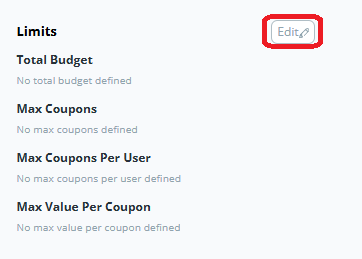
-
Configure Limits and Budgets
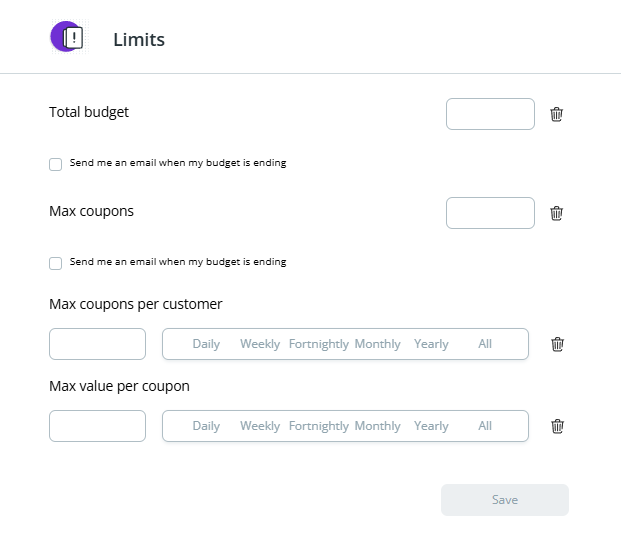
Set any of the following options as needed:- Total Budget: Maximum total discount value across all customers
- Max Number of Coupons: Total number of times the campaign can be redeemed
- Max Coupons per Customer: Limit how many times each customer can redeem the campaign
- Max Value per Coupon: Cap the discount value per redemption
Note: You can leave all fields blank if you do not want to apply limits.
-
Save Your Changes
Click Save to apply your settings.
How to Update Limits on an Existing Campaign
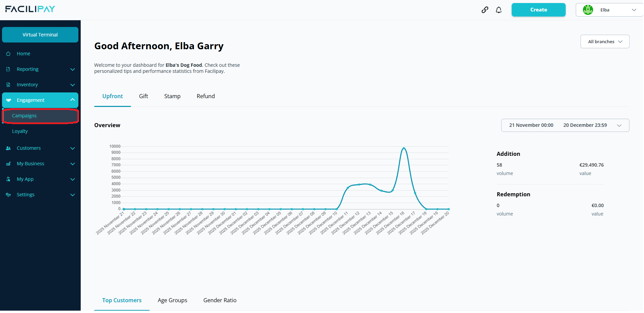
- Go to Engagement → Campaigns
- Find the campaign you want to update
- Select Edit
- Update limits in the Limits & Budgets section
- Click Save

What Happens After You Save
Your campaign runs with the defined limits and budget settings. Once a limit is hit, no further redemptions are accepted.
Tips & Best Practices
-
Cap per customer: Avoid one customer absorbing your entire campaign budget.
-
Set a total budget: A total budget is a safety net — the campaign auto-stops once the cap is reached.
-
Review and refine: If a campaign hits its limit early, increase the budget or tighten per-customer caps next time.