
Before You Begin
- You must be logged into the Facilipay Dashboard with admin access.
- Have your typical prep and delivery times measured before configuring.
Step-by-Step: Set Prep Times
-
Access Your Branch Settings
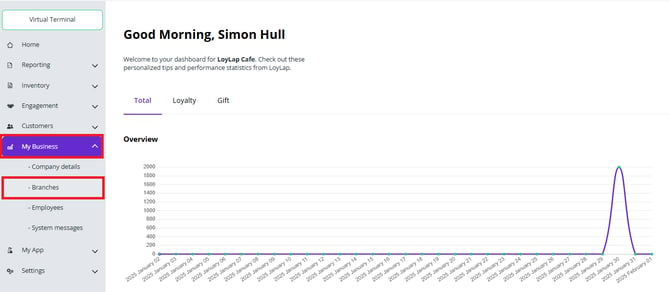
From your Facilipay Dashboard, navigate to My Business → Branches. Select the branch you want to configure prep times for.
-
Open Ordering Settings
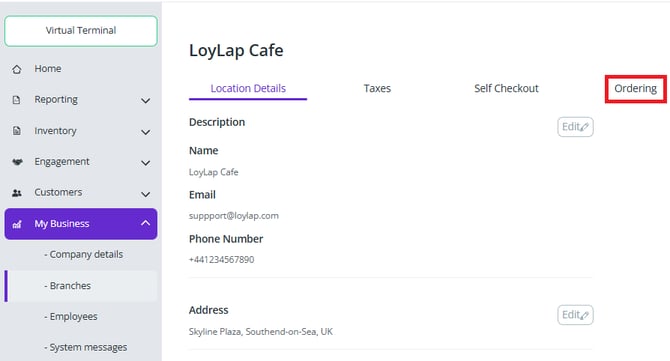
In the branch view, click Ordering Settings. Here you can configure:- Base Prep Time
- Whether the branch accepts orders
- Auto-accept orders
- Requirement for utensils or phone number
-
Configure Collection & Delivery
On the left-hand menu, select Collection or Delivery. Enable or disable these options as required, and adjust any additional settings. -
Set Overall Order Timing
Base Prep Time is the starting point for all orders. Any additional Delivery or Fixed Delivery time is added to the prep time for total order duration.Example:
- Prep Time = 20 minutes
- Delivery Time = 55 minutes
- ASAP Delivery = 1 hour 15 minutes from order placement
What Happens After You Save
Customers see accurate order fulfilment times when checking out, and your team has clear targets to work to.
Tips & Best Practices
-
Add a buffer: Set times slightly higher than your average to handle peak periods reliably.
-
Adjust for peaks: Consider adjusting prep time during busy periods to maintain quality.
-
Review regularly: Compare promised times to actual delivery and refine over time.