
Before You Begin
- You must be logged into the Facilipay Dashboard with admin access.
- Decide how long online ordering should remain disabled before you start.
Step-by-Step: Disable Online Ordering
-
Access Branch Settings
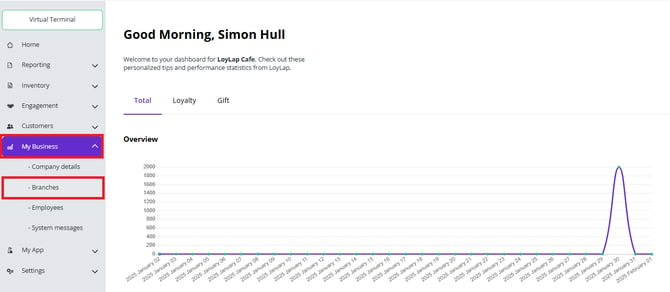
From your Facilipay Dashboard, open the left-hand menu and select My Business. From the dropdown menu, click Branches. The list of available branches will display.
-
Select the Branch
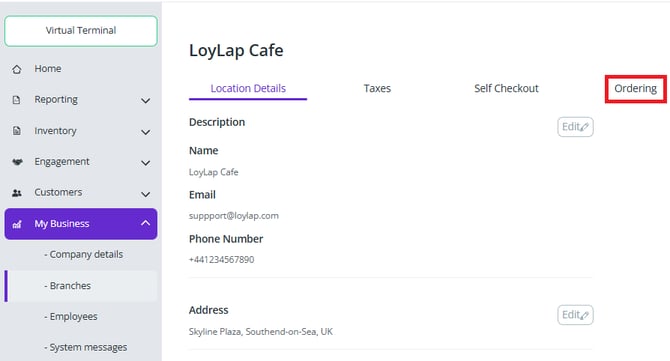
Click on the branch name where online ordering needs to be disabled. The Branch Details page opens. -
Open Ordering Settings
Select the Ordering tab and click Edit to modify the ordering configuration.
-
Disable Online Ordering
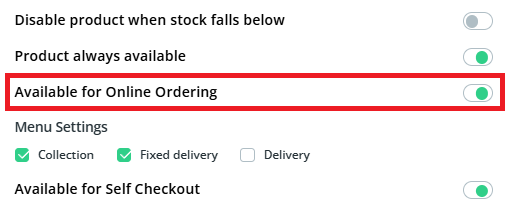
Locate the Available for Ordering toggle. Switch the toggle from green to grey to disable online ordering.A dropdown menu will appear asking when ordering should resume. Select the appropriate option:
- Choosing "Until Re-enabled" keeps online ordering disabled until manually turned back on.
Click Save to apply the changes.
What Happens After You Save
Online ordering is disabled for the selected branch and remains unavailable based on the option you selected. Customers visiting your online ordering page will see a notice that orders are currently unavailable.
Tips & Best Practices
-
Communicate with customers: If the closure is planned, post a notice on social media or email regular customers.
-
Set a reminder to re-enable: If you select a temporary disable, set a reminder so you don't forget to turn it back on.
-
Need help? For setup issues, contact support@facilipay.io.