
Before You Begin
- You must be logged into the Facilipay Dashboard with admin access.
- Decide whether to disable online ordering temporarily or until manually re-enabled.
Step-by-Step: Disable Online Ordering
-
Access Your Branches
From the side menu of your Facilipay Dashboard, navigate to My Business → Branches. You'll see a list of all branches available for editing.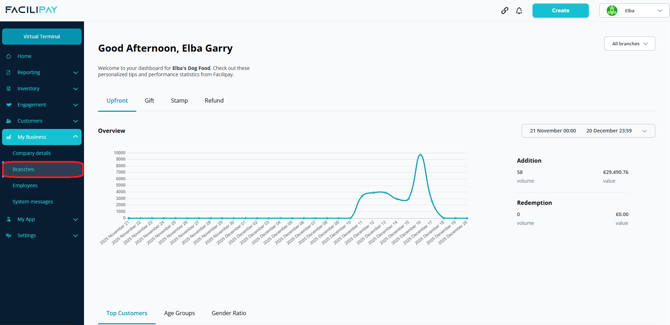
-
Select the Branch
Click the branch name where you want to disable online ordering. -
Open Ordering Settings
Click on the Ordering tab and select Edit to modify your ordering options.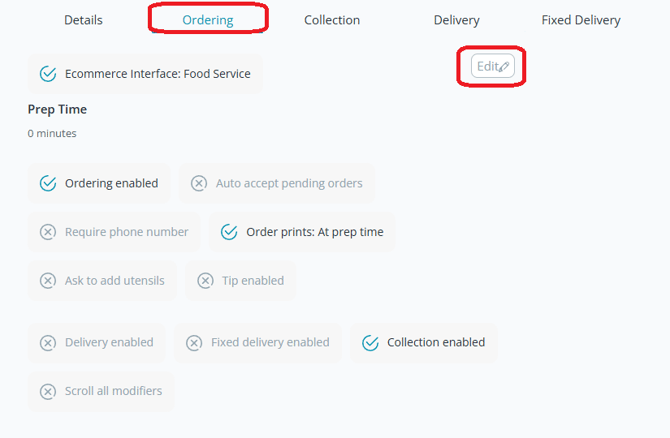
-
Disable Online Ordering
Toggle Available for Ordering from green to grey to turn off online orders. A new dropdown will appear allowing you to choose when to re-enable online ordering. Select your preferred option, then click Save.
What Happens After You Save
Your branch's online menu is hidden from customers until you choose to re-enable it.
Tips & Best Practices
-
Use the time-bound option: If you know exactly when ordering will resume, use the time-bound disable so it re-enables automatically.
-
Inform staff: Let your team know online ordering is disabled to avoid confusion at the till.
-
Need help? For setup queries, contact support@facilipay.io.