
Before You Begin
- You must be logged into the Facilipay Business Portal with access to gift card reporting.
- Decide on the reporting period before running the report — the figures are calculated based on the selected date range.
Step-by-Step: Access the Liability Report
-
Log In to the Business Portal
Sign in to the Facilipay Business Portal. -
Open the Gift Cards Report
Navigate to Reporting from the left-hand menu and select Gift Cards.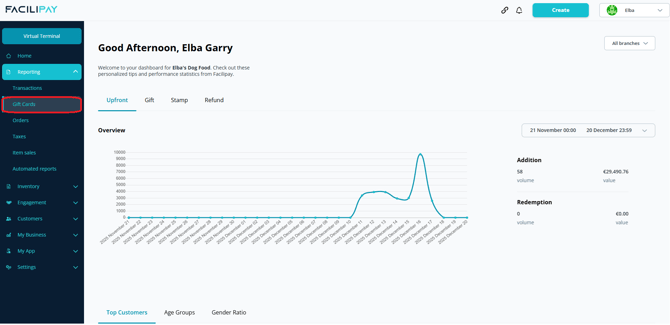
-
Review the Default View
The report loads with a default date range (typically the current month). The Starting Liability reflects the outstanding gift card balance at the beginning of the selected range, while Ending Liability reflects the balance at the end.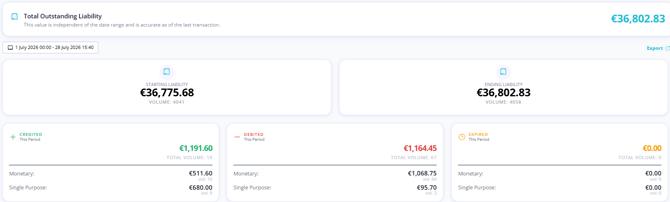
Credited, Debited, and Expired Values
These fields explain how the liability changes during the selected reporting period:
-
Credited — The total value added to gift cards during the reporting period.
-
Debited — The total value redeemed from gift cards during the same period.
-
Expired — The value of gift cards that expired during the reporting period.
Together, these values determine how the Starting Liability changes to the Ending Liability.
For a more detailed explanation of accounting terminology used in this report, see Understanding Gift Card Accounting Terminology.
Current Liability
The Current Liability represents the total outstanding balance of all active gift cards for the business. It is calculated as:
Credited − Debited − Expired
To calculate the full outstanding liability, run the report from the date you first started using Facilipay up to the present date.
Intra-Merchant Transfers
Some businesses may see Intra-Merchant Transfers listed within the report. These occur when a gift card is purchased at one branch but redeemed at another branch within the same organisation.
This movement of value between locations is tracked separately so balances remain accurate across all branches. For more details on how these transfers work, see Understanding Intra-Merchant Transfers.
Tips & Best Practices
-
Run monthly: Schedule a routine review of the Liability Report to support your accounting reconciliation.
-
Match against records: Validate the report against your internal records of gift card sales and redemptions.
-
Need help? For questions on liability reporting or VAT treatment, contact support@facilipay.io.