
Before You Begin
- You must be logged into the Facilipay Business Portal.
- Your user account must have billing permissions to view invoices.
Step-by-Step: View and Download Invoices
-
Open Billing Settings
Log in to the Facilipay Dashboard, click your name in the top right, then select Billing from the dropdown.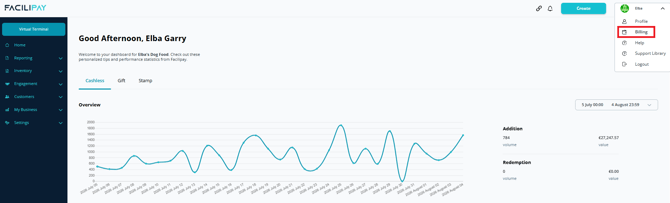
-
View Invoice History
Scroll down to the History section to see all of your invoices. You can view both:- Paid invoices
- Unpaid invoices
-
Download an Invoice
Select the invoice you want to download, then save it as a PDF for your records.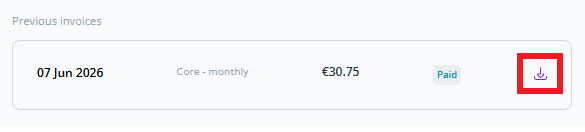
What You Can Do With Your Invoices
-
Reconcile payments with your accounting system
-
Share invoices with your accountant or finance team
-
Maintain a record of your subscription and billing history
Tips & Best Practices
-
Download regularly: Save invoices monthly to keep your accounting records up to date.
-
Check unpaid invoices: Review the unpaid section regularly so any overdue invoices can be settled before they affect your service.
-
Need help? For billing or invoice queries, contact support@facilipay.io.