
Before You Begin
- You must be logged into the Facilipay Dashboard with access to reporting.
- Tax rates must already be configured against your products or services for the report to display accurately.
Step-by-Step: View Your Taxes Report
-
Open Tax Reporting
Log in to the Facilipay Dashboard, click Reporting, then select Taxes.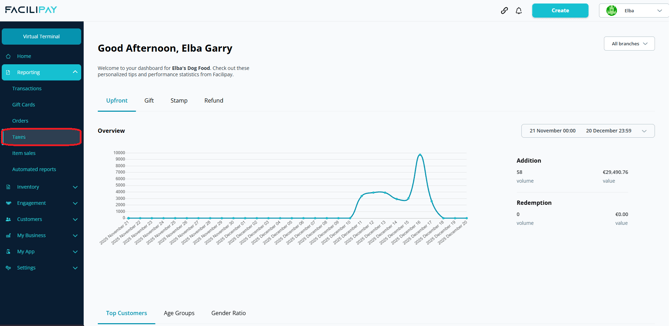
-
Review the Report
The report defaults to the current month. At the top of the page you'll see a summary showing:- Applicable sales
- Amount collected
-
View the Tax Breakdown
Scroll down to see the amount collected for each tax rate applied during the period.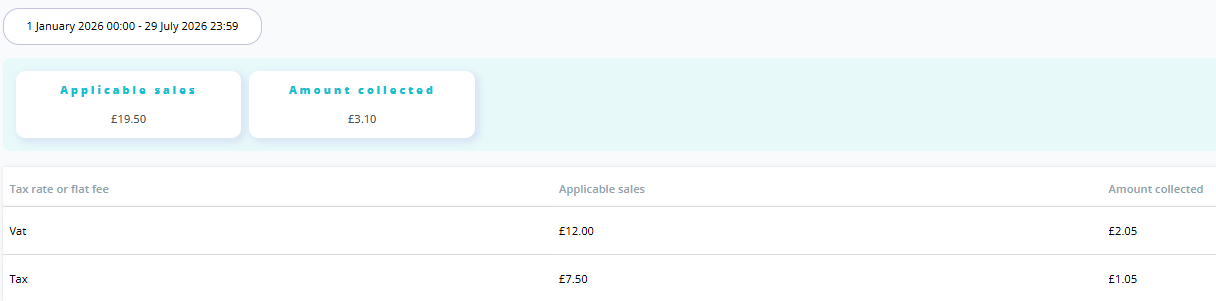
What You Can Do With This Report
-
Reconcile tax collected against your accounting system
-
Prepare VAT or sales tax filings with accurate, up-to-date figures
-
Verify that products are configured with the correct tax rates
Tips & Best Practices
-
Use custom date ranges: Match the date range to your tax filing period for the most relevant breakdown.
-
Check tax rates regularly: If figures look unexpected, verify the tax rates configured against your products.
-
Need help? For questions about the Taxes Report, contact support@facilipay.io.